
Get 50% OFF QuickBooks for 3 months*

Buy now
Switch to QuickBooks and 70% off for 3 Months
October 22, 2025
Solved

How do I accurately reflect the CalSavers Program deduction in QB? How do I reflect an after tax Roth IRA which is not in the drop box?

  • October 22, 2025
  • 1 reply
  • 25 views
No text available
Best answer by EmanE17

Hey Ann,


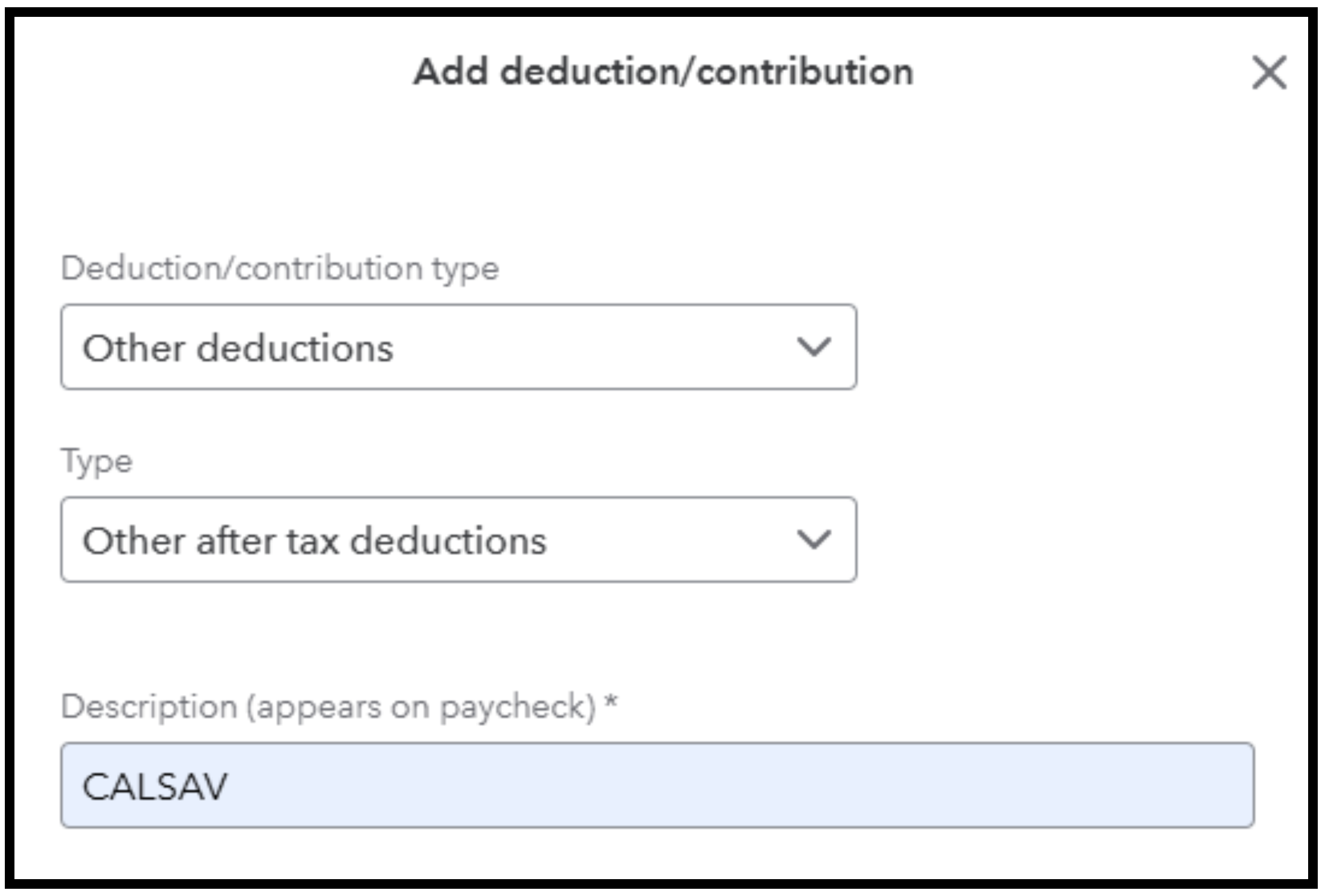
You can set up a custom after-tax deduction by choosing Other deductions from the Deduction Type dropdown. I’ll walk you through it.


Since CalSavers is an after-tax Roth IRA and isn’t listed in the dropdown, here’s how you can add it manually:
 

  1. Go to the Accounting menu on the left, click Payroll, then Employees.
  2. Select the employee, then edit the Deductions and contributions section.
  3. Click + Add deduction/contribution.
  4. For the Deduction/contribution type, choose Other deductions.
  5. For Type, select Other after-tax deductions.
  6. Add a description like “CALSAV” or “CalSavers Roth IRA” so it shows clearly on the pay stub.


  7. Enter the amount or percentage based on the CalSavers plan and what the employee wants.
  8. Hit Save when you’re done.


If you have any other questions, just hit Reply. We're here to help!

1 reply

EmanE17QuickBooks TeamAnswer
QuickBooks Team
October 22, 2025

Hey Ann,


You can set up a custom after-tax deduction by choosing Other deductions from the Deduction Type dropdown. I’ll walk you through it.


Since CalSavers is an after-tax Roth IRA and isn’t listed in the dropdown, here’s how you can add it manually:


  1. Go to the Accounting menu on the left, click Payroll, then Employees.
  2. Select the employee, then edit the Deductions and contributions section.
  3. Click + Add deduction/contribution.
  4. For the Deduction/contribution type, choose Other deductions.
  5. For Type, select Other after-tax deductions.
  6. Add a description like “CALSAV” or “CalSavers Roth IRA” so it shows clearly on the pay stub.


  7. Enter the amount or percentage based on the CalSavers plan and what the employee wants.
  8. Hit Save when you’re done.


If you have any other questions, just hit Reply. We're here to help!

QuickBooks Team
October 24, 2025

Hello, Ann.
 
I wanted to follow up on your concern and see if the solution we provided has resolved your issue. Please let us know if everything is now working as expected or if you have any questions.


We’re happy to assist you further. I look forward to hearing from you.
