Hi there, @missmissySEI.
You are correct that in QuickBooks Desktop (QBDT), there is no "effective date" field for pay rate changes.
When you update the pay rate, it does not affect any past paychecks or pay stubs. QuickBooks keeps each paycheck as a permanent historical record, so changing the rate in the employee profile only sets the "default" rate for the next paycheck you create.
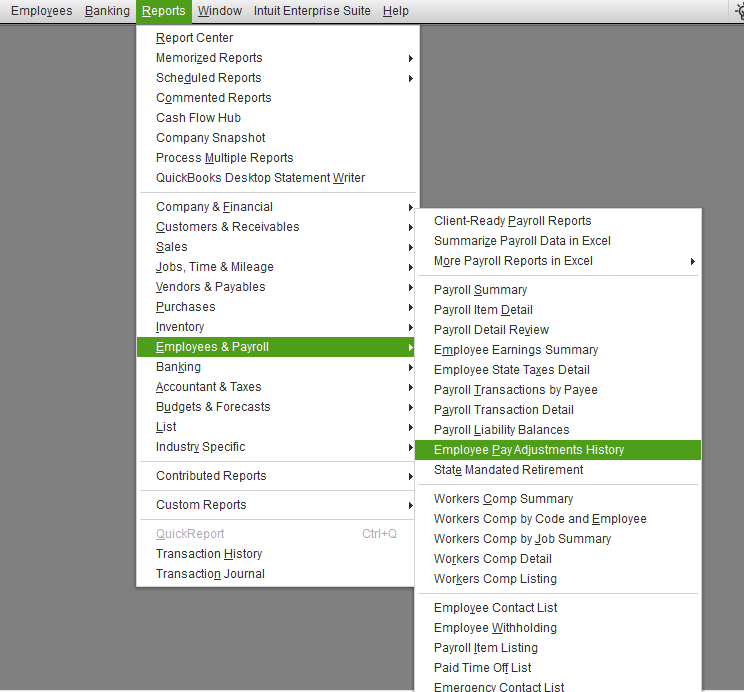
To view the applied pay rate adjustments, you can run the Employee Pay Adjustments History Report. Here’s how:
- Go to the Reports menu.
- Select Employees & Payroll.
- Choose Employee Pay Adjustments History.
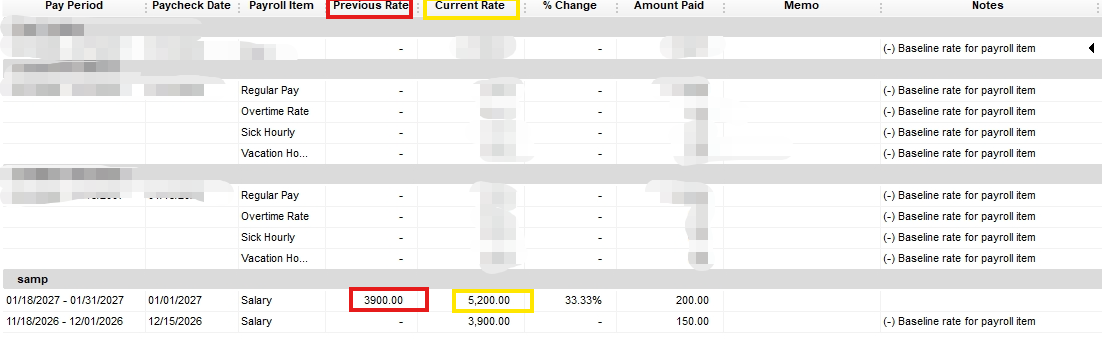
**Sample amounts only**
This report displays the employee's name, the pay item that was changed, the old rate, the new rate, and the date the modification was made.
If you have follow-up questions, please don't hesitate to click the Reply button.
