
SUMMER SAVINGS 90% OFF QuickBooks for 3 months* Ends 8/27

Buy now
Switch to QuickBooks and 70% off for 3 Months
April 24, 2020
Solved

How do you edit and save employee records on the advanced payroll?

No text available
QuickBooks Team
April 24, 2020

I'll share with you the steps to edit and save employee records in QuickBooks Online Advanced Payroll (QBOAP), @morts60.


Let's open the employee's profile to complete this task. It helps you ensure your employee records are up to date. I'll guide you how. 

  1. Go to Employees from the left menu. 
  2. Select an employee's name. 
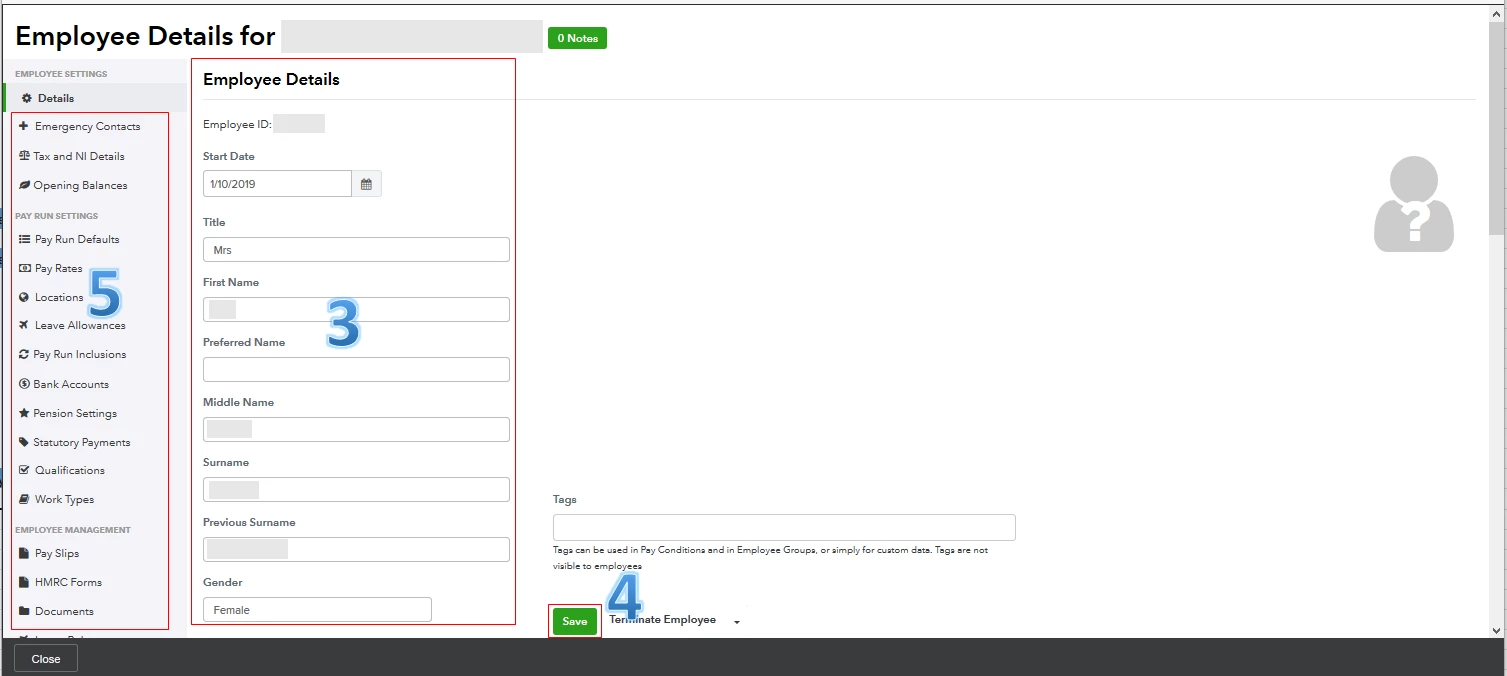
  3. Update the necessary information in the Employee Details screen. 
  4. Scroll down the page and click Save. 
  5. Review the other Employee Settings, Pay Run Settings, and Employee Management tabs from the left panel.
  6. Click Save in each tab. 


The screenshot below shows you the third to fifth steps. For more details, see the Managing your employees section through this article: QBOAP Hub. 
 

Once updated, you can now create a new pay run for your employee. 


I'll be right here to help if you need further assistance. Wishing you and your business continued success while using QuickBooks, @morts60.

1 reply

QuickBooks Team
April 24, 2020

I'll share with you the steps to edit and save employee records in QuickBooks Online Advanced Payroll (QBOAP), @morts60.


Let's open the employee's profile to complete this task. It helps you ensure your employee records are up to date. I'll guide you how. 

  1. Go to Employees from the left menu. 
  2. Select an employee's name. 
  3. Update the necessary information in the Employee Details screen. 
  4. Scroll down the page and click Save. 
  5. Review the other Employee Settings, Pay Run Settings, and Employee Management tabs from the left panel.
  6. Click Save in each tab. 


The screenshot below shows you the third to fifth steps. For more details, see the Managing your employees section through this article: QBOAP Hub. 


Once updated, you can now create a new pay run for your employee. 


I'll be right here to help if you need further assistance. Wishing you and your business continued success while using QuickBooks, @morts60.