


Form 941 Deadlines: What Small Business Owners Need to Know Before July 31, 2026
Hi there, and thanks so much for joining us! These mini guides are here to help you feel confident navigating your QuickBooks account, so you can spend less time worrying about paperwork and more time running your business. This month we're talking about Form 941: what it is, who needs to file it, and how QuickBooks can lighten the load. With the Q2 deadline landing on July 31, now's a great time to get ahead of it. Let's dive in!
What Is Form 941?
Think of it as the Employer's Quarterly Federal Tax Return, your way of reporting wages paid to employees and the taxes withheld each quarter, plus your share of certain payroll taxes.
Each 941 covers:
- Federal income tax withheld from employee paychecks
- Social Security tax (6.2% each, employee and employer)
- Medicare tax (1.45% each, employee and employer)
The good news? Since it's built on payroll you've already run, filing is mostly about reporting and reconciling, not fresh calculation.
Who Needs to File?
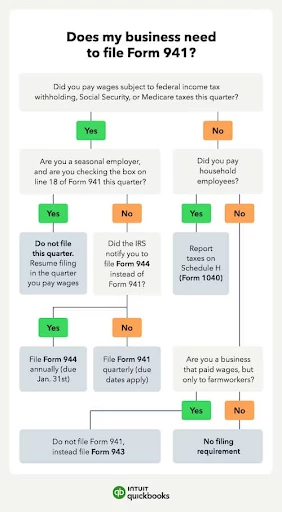
You'll generally need to file if you:
- Have employees
- Withhold federal income tax, Social Security, or Medicare from their wages
A separate 941 is required each quarter, and once you start filing, you'll keep filing every quarter (even $0 quarters) until you file a final return or close the business.
A few exceptions worth knowing:
- Farm employers file Form 943 instead.
- Household employers use Schedule H instead.
- Small employers ($1,000 or less in annual payroll tax liability) may qualify for annual Form 944 instead, but only after the IRS approves it in writing. You can't self-select into this one.
2026 Filing Deadlines
Mark your calendar! Form 941 is due by the last day of the month after each quarter ends:
- Q1 (Jan through Mar): April 30, 2026
- Q2 (Apr through Jun): July 31, 2026
- Q3 (Jul through Sep): November 2, 2026 (Oct 31 is a Saturday)
- Q4 (Oct through Dec): February 1, 2027 (Jan 31 is a Sunday)
If a deadline falls on a weekend or holiday, it shifts to the next business day.
Bonus tip: if you deposited all your quarterly taxes on time and in full, you actually get 10 extra calendar days to file. (Just note this only extends the filing deadline, not your deposit due dates.)
What You'll Report
Here's what you'll need to have on hand:
- Total wages, tips, and other compensation
- Federal income tax withheld
- Taxable Social Security and Medicare wages
- Total tax liability for the quarter
- Deposits already made
- Any balance due or overpayment
If what you deposited doesn't quite match what you owe, the IRS will flag it, so it's worth taking a moment to double check your payroll reports first. If your return shows you overpaid, you can apply the extra to next quarter's return or request a refund. If you underpaid, that balance is due right away rather than at your next filing.
How QuickBooks Payroll Helps
Good news if you run payroll through QuickBooks Online Payroll, it's already doing a lot of this work for you:
- Every payroll run (wages, withholdings, employer contributions) rolls up automatically by quarter.
- Your total tax liability is calculated and compared against deposits already made.
- Depending on your plan, QuickBooks can e-file 941 for you, or prep it so you can file manually.
Here's how to file in QuickBooks Online Payroll:
- Go to Payroll, then Payroll Tax.
- Select Filings (forms ready to file appear under Action Needed).
- Find Form 941 for the quarter and select File.
- Give the auto populated figures a quick review against your payroll reports.
- Choose to e-file or print and mail, whichever fits your plan.
Using QuickBooks Desktop Payroll Enhanced instead? Head to Employees, then Payroll Tax Forms and W-2s, then Process Payroll Forms.
A couple of things QuickBooks won't catch on its own:
- Wages paid outside QuickBooks Payroll (for example, an unrecorded manual check)
- State unemployment or withholding filings (these are separate from 941)
- Corrections to prior quarters (you'll need Form 941-X for those)
- Household or farm employee wages (different forms apply)
If your situation feels more complex than usual, it's always a good idea to loop in an accountant before filing.
Paying What You Owe
Here's a helpful distinction: Form 941 reports what you owe, but it doesn't actually pay it. Most employers deposit on a schedule (monthly or semi-weekly, based on your IRS lookback period) throughout the quarter.
Owe less than $2,500 for the quarter? You can pay it in full with your timely filed return instead, no separate deposits needed.
A couple of easy ways to pay:
- QuickBooks Payroll (if your plan includes auto tax payments)
- EFTPS (eftps.gov, and it's free)
Just keep in mind, penalties are tracked separately:
- Late filing: about 5% of unpaid tax per month or partial month, up to 25%
- Late deposits: 2% to 15%, scaling with how many days late
Being on time with one doesn't protect you from a penalty on the other, so it's worth staying on top of both.
Pro tip: Reconcile your payroll reports monthly rather than waiting until filing time. It catches mismatches early and makes each quarterly 941 that much faster to file.
You've got this!
Once payroll is set up correctly in QuickBooks, Form 941 becomes much more of a quarterly review and confirmation step than a from scratch calculation. Staying current means fewer surprises and a lot more confidence in your numbers. As always, we're happy to help you stay on track.
For official guidance straight from the source, visit the IRS's Form 941 page: https://www.irs.gov/forms-pubs/about-form-941
Helpful QuickBooks resources:
- Pay and file payroll taxes and forms electronically (QBO Payroll): https://quickbooks.intuit.com/learn-support/en-us/help-article/electronic-filing/pay-file-payroll-taxes-forms-online-payroll/L8JqxhbaE_US_en_US
- E-file 940, 941, and 944 tax forms (QB Desktop Payroll Enhanced): https://quickbooks.intuit.com/learn-support/en-us/help-article/payroll/e-file-940-941-944-tax-forms/L0ga0tEz4_US_en_US