
Get 50% OFF QuickBooks for 3 months*

Buy now
Switch to QuickBooks and 70% off for 3 Months
October 1, 2025
Solved

Prompt to install something when trying to access it from SDK

  • October 1, 2025
  • 2 replies
  • 15 views

Hello,


I am a DEV from V-Technologies (StarShip). Our customer who is going to on board meets a problem. When they try to access QBE from our product (using SDK), it will prompt a window like this, seems to installed something but failed:
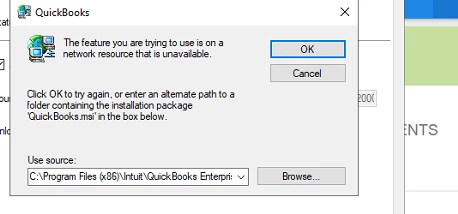
 

and here is the detailed description from our support:


Current State: Whenever a user logs into starship from any location the popup comes on the server and prevents starship from returning any records until the cancel is clicked on the error(typically has be done twice as the error will pop up again after the first time). Once the error is dismissed then the user can connect and continue with shipping. Users are connecting to starship online from local computers but the source connector is on the server.


Is there something wrong the installation? Could you give me some advice to research this?


Thank you in advance!

Best answer by JoelES

Thank you for bringing this matter to our attention, Mason. This issue occurs when establishing an initial link between a third-party application using the QuickBooks Desktop (QBDT) SDK and the company file.


Please note that there is a dedicated forum called Intuit Developer specifically designed to assist with third-party SDK applications. Their team of product developers and engineers is highly skilled in helping you with the implementation and optimization of this process.


To post your concern, please follow these steps:


  1. Open this link: https://help.developer.intuit.com/s/.
  2. Choose your QuickBooks product.
  3. Tap on Ask a Question
  4. Sign in, then follow the onscreen pop-ups to proceed.


From the Intuit Developer Dashboard, you can also search for any topics you need help with in the Search bar provided.


Please let us know if you have any follow-up questions or concerns about QuickBooks. We are here to help.

2 replies

SIAB
Level 2
October 1, 2025

Which QB Desktop year version?


October 1, 2025

Thanks for your willingness, but maybe I should go the developer forum as JoelES said...

JoelESQuickBooks TeamAnswer
QuickBooks Team
October 1, 2025

Thank you for bringing this matter to our attention, Mason. This issue occurs when establishing an initial link between a third-party application using the QuickBooks Desktop (QBDT) SDK and the company file.


Please note that there is a dedicated forum called Intuit Developer specifically designed to assist with third-party SDK applications. Their team of product developers and engineers is highly skilled in helping you with the implementation and optimization of this process.


To post your concern, please follow these steps:


  1. Open this link: https://help.developer.intuit.com/s/.
  2. Choose your QuickBooks product.
  3. Tap on Ask a Question
  4. Sign in, then follow the onscreen pop-ups to proceed.


From the Intuit Developer Dashboard, you can also search for any topics you need help with in the Search bar provided.


Please let us know if you have any follow-up questions or concerns about QuickBooks. We are here to help.

October 1, 2025

Thanks for your reminder. Will do this...