
Get 50% OFF QuickBooks for 3 months*

Buy now
Switch to QuickBooks and 70% off for 3 Months
November 13, 2025
Question

QB Enterprise version issue

  • November 13, 2025
  • 2 replies
  • 15 views

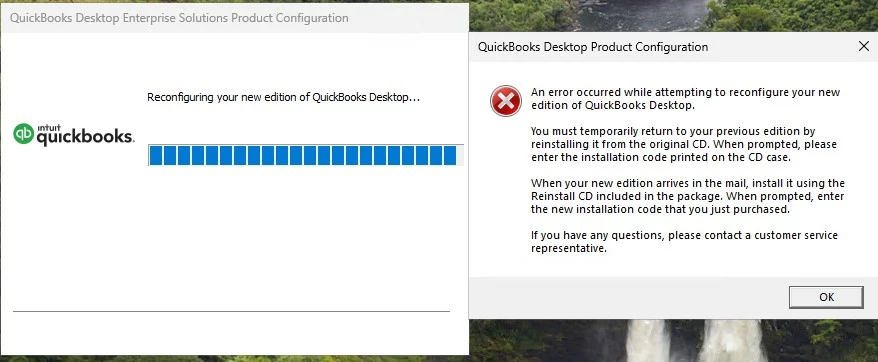
Assisting client migration to Windows 11, but unable to run QB Enterprise due to version issue.  Appears client started with v21 then upgraded to v24 on Windows 10, confirmed that she is using v24 to access QB database.  Installed v24 on Win11, but unable to open database due to version.  Uninstall v24, install v21 then reinstall v24, now getting the following error message when opening the QB program (before accessing database).  Thank you in advance for your help.
2 replies

QuickBooks Team
November 13, 2025

Thank you for letting us know about your situation, GFA-SEA. I get how challenging managing your QuickBooks Desktop (QBDT) can be, and appreciate the patience and steps you've taken. Since you're still experiencing issues even after trying all the troubleshooting steps, I recommend contacting our customer support team for further assistance. They have tools to access your account in real time, so they can identify the root cause of the problem.


To reach them, you can follow these steps:
 

  1. Go to Help.
  2. Select QuickBooks Desktop Help/Contact Us.
  3. Use the Search questions, keywords, or topics field to enter your question.
  4. You'll get a list of related articles.
  5. Select Contact Us in the help window if you don't get the answers you need.
  6. Choose to chat with us or Have us call you.
     

For more details, including support hours, see this article: Contact QBDT support.


Addressing the issue quickly can prevent it from becoming more complex or causing additional problems. Let me know if there's anything else I can assist you with by clicking the Reply button below.

SIAB
Level 2
November 14, 2025

@GFA-SEA 

Install QB Desktop 2021 and 2024 on the same machine and run both at the same time to isolate the problem.