You made the right choice in reaching out to us, BeatriceA.
In QuickBooks Online (QBO), you have two ways to undo the reconciliation.
You can do it by manually editing the transactions within the register. We would not recommend doing this if there are lots of transactions you wish to remove from the reconcile as the reconcile reports do not show manual removals.
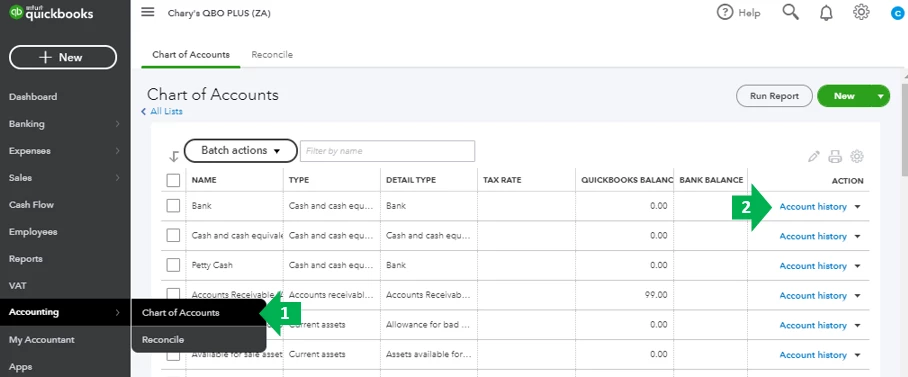
- Go to the Accounting menu. Then select Chart of Accounts.
- Find the account and select Account history or View register.
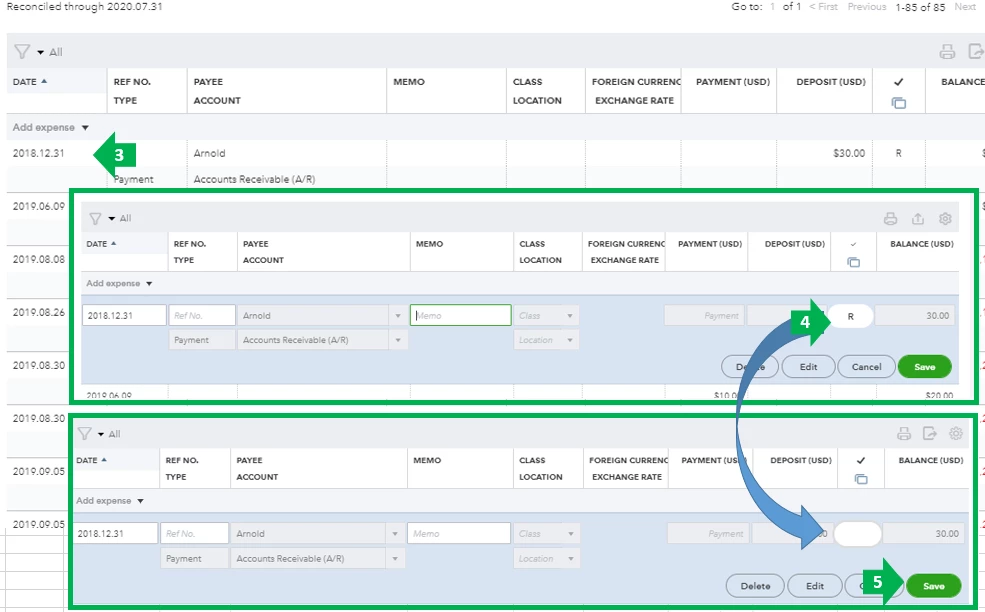
- Select the transaction you want to unreconciled.
- Click the box with "R" and keep clicking it until the box is blank. This removes the transaction from the reconciliation.
- Select Save.
Feel free to read through this article for the entire process on how to undo reconciliation: How to Unreconcile a Transaction or Undo a Reconciliation.
Another option is using the special reconciliation tool which allows you to undo several transactions on past reconciliation by undoing the reconciliation itself. This is only available for accountants who use QuickBooks Online Accountant.
Learn more about this by visiting this link: Undo a client’s reconciliation in QuickBooks Online Accountant
Feel free to visit these links about reconciliation in QBO for reference:
Should you have anything else you'd like to go over while reconciling, feel free to reach out to us again. I'm always here to assist you further.
