
Get 50% OFF QuickBooks for 3 months*

Buy now
Switch to QuickBooks and 70% off for 3 Months
New Member
March 4, 2022
Solved

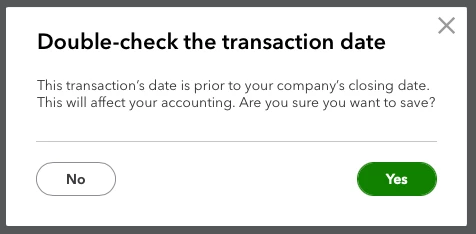
Closing Date Warning Popup

  • March 4, 2022
  • 1 reply
  • 3 views

I've moved my data from QBD but now whenever I create or adjust anything in QBO I have the warning date about closed books? No idea why. Suggestions on a postcard please.



Best answer by Ashleigh1

Hello Mark, 


Welcome to the Community page, 


All you need to do is go to the main cog wheel> account and settings> advanced>accoutning>close the books- toogle it off >save> done once you have turned this off you should not get that pop up box anymore. 

1 reply

Ashleigh1Answer
Level 14
March 4, 2022

Hello Mark, 


Welcome to the Community page, 


All you need to do is go to the main cog wheel> account and settings> advanced>accoutning>close the books- toogle it off >save> done once you have turned this off you should not get that pop up box anymore. 

New Member
March 4, 2022

Found the setting, it was set to something like 2024? Turned it off, changed a test invoice, still popped up :(