Get 50% OFF QuickBooks for 3 months*

Buy now
Switch to QuickBooks and 70% off for 3 Months
New Member
November 7, 2025
Question

New Layout - Backwards Step

  • November 7, 2025
  • 1 reply
  • 4 views

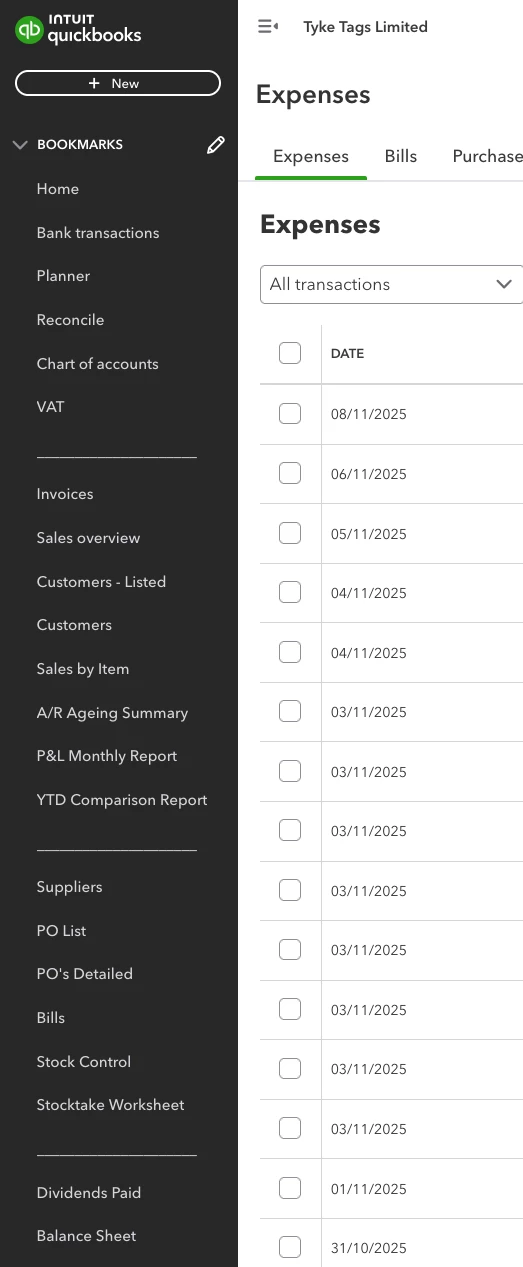
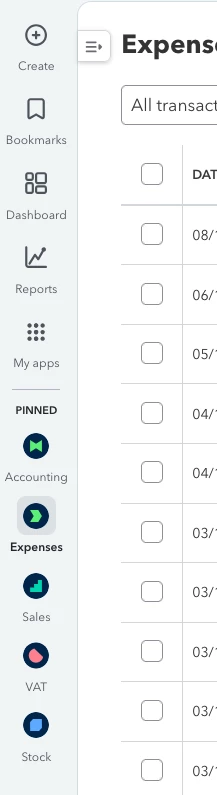
After testing the updated GUI, I've found it significantly more cumbersome to access the pages I use most frequently. The bookmarks feature, which was previously streamlined and efficient, now requires an extra click to access and additional scrolling to locate specific items. This introduces unnecessary friction in my daily workflow.As illustrated in the attached screenshot, the current bookmarked menu excels in usability: it places all essential options front and centre, enabling one-click access without any hunting. By layering in more mouse movements and scrolling, the new design undermines this efficiency, it's a clear regression that slows productivity in ways that feel counterintuitive.To address this, I recommend allowing users to customise the new "Apps" menu. Specifically, enable options to hide non-bookmarked pages, effectively replicating the clean, personalised view of the existing bookmarks interface. This simple edit would restore usability while preserving the benefits of the update.More broadly, Intuit should prioritise layout stability. Frequent menu and interface overhauls disrupt user muscle memory just as habits form, leading to frustration and reduced adoption. Focusing on iterative refinements rather than wholesale changes would better serve long-term user satisfaction and retention. 


1 reply

New Member
November 7, 2025

Also, your forums are totally broken when using a Mac, been like that for months. You can't attached files, or it weirdly logs you out when trying to post. I had to find an old PC so that I could post in here and attached these screenshots. 

QuickBooks Team
November 7, 2025

I appreciate the specific example and workaround you shared with the other users, Mark. I can see how the previous bookmarked view enabled immediate, one‑click access, while the new layout adds extra mouse movements and scrolling that reduce your productivity as a business owner.


We’ve noted your suggestions to improve product navigation and recommend sending this feedback directly to our product development team so they can evaluate restoring a more personalised bookmark experience.


Here's how you can do it:


  1. Click the Gear icon.
  2. Select Feedback.
  3. Enter a brief description of your suggestion.
  4. Click Next to submit.


I acknowledge the issue you experienced posting to the Community. When attaching a file, did you receive an error message? Please note the forum supports only JPG, GIF, PNG, and PDF files, and allows a single attachment up to 9 MB.


If those requirements are met, we can use a private or incognito browser. It will help us avoid any saved data that may cause unusual behavior, such as logging you out of the website or preventing you from attaching a file.


Here's the menu paths depending on your browser:


  • Chrome: (Menu) → New Incognito window
  • Edge: New InPrivate window
  • Firefox: New Private Window
  • Safari (Mac): File New Private Window


Alternatively, we can try another supported browser to see if the issue is browser-related.


You're always welcome to share your opinions or questions about QuickBooks. We're 24/7 available to address it for you.

New Member
November 7, 2025

I'll post a screenshot of the forum issue when I next have it. 


I have already sent the feedback.