
Get 50% OFF QuickBooks for 3 months*

Buy now
Switch to QuickBooks and 70% off for 3 Months
March 24, 2025
Solved

Adding a new invoice--if I'm adding a new customer, QB puts the name in both the company field and cust display fields--then it's duplicated on the invoice. Need to fix

  • March 24, 2025
  • 1 reply
  • 10 views

Need to fix it back as it was. It didn't do this previously. I go in to take it out of the company name field, then it turns red/error, and makes me put it in the customer name field AGAIN. I'd like the company field name to be deleted if possible. Help?

Best answer by Jayson_E


Currently, QuickBooks Online (QBO) doesn't have the option to delete the "Company Name" field when creating new customers, bexmg. However, I can provide tips on how to manage this effectively. I’d be glad to discuss the details below.


This field is designated to accommodate businesses and organizations, as many customers are not individuals but companies.


To avoid duplication of the company name in the customer display name field, I recommend entering a name in the "First name" field before filling out the "Company name" field. Entering a first name will prevent the system from automatically duplicating the company name into the customer display name field.


When you mentioned that it's duplicated on the invoice, could you clarify where or how it shows up as duplicate? Providing us with additional details would help us give you a more targeted solution.


On the other hand, if you meant that it'll show up in the +Add customer dropdown and Bill to field, the Bill to field shows the Company name field to show up when you create an invoice, while the +Add customer dropdown shows the Customer display name field.
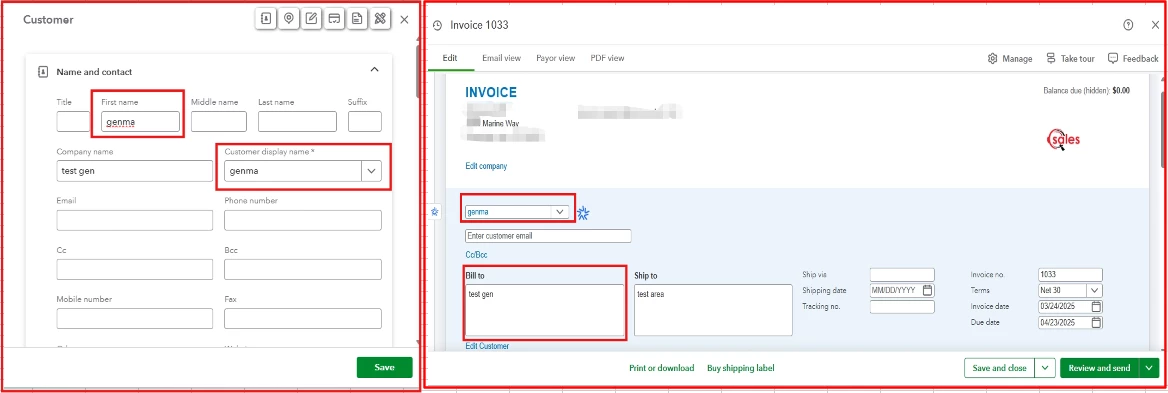


But if the Company name field is empty, it'll automatically show the Customer displayed name in the invoice transaction.


However, if you meant something else, please feel free to share more details.


Additionally, you can refer to this article for helpful guidelines on how to manage invoice payments in QBO: Record invoice payments in QuickBooks Online.


Whenever you need assistance in managing customers and invoices in QBO, please remember that we're always here to guide you.

1 reply

Jayson_EQuickBooks TeamAnswer
QuickBooks Team
March 24, 2025


Currently, QuickBooks Online (QBO) doesn't have the option to delete the "Company Name" field when creating new customers, bexmg. However, I can provide tips on how to manage this effectively. I’d be glad to discuss the details below.


This field is designated to accommodate businesses and organizations, as many customers are not individuals but companies.


To avoid duplication of the company name in the customer display name field, I recommend entering a name in the "First name" field before filling out the "Company name" field. Entering a first name will prevent the system from automatically duplicating the company name into the customer display name field.


When you mentioned that it's duplicated on the invoice, could you clarify where or how it shows up as duplicate? Providing us with additional details would help us give you a more targeted solution.


On the other hand, if you meant that it'll show up in the +Add customer dropdown and Bill to field, the Bill to field shows the Company name field to show up when you create an invoice, while the +Add customer dropdown shows the Customer display name field.


But if the Company name field is empty, it'll automatically show the Customer displayed name in the invoice transaction.


However, if you meant something else, please feel free to share more details.


Additionally, you can refer to this article for helpful guidelines on how to manage invoice payments in QBO: Record invoice payments in QuickBooks Online.


Whenever you need assistance in managing customers and invoices in QBO, please remember that we're always here to guide you.

June 24, 2025

I agree.  This really needs to be fixed.  It did not use to be a problem, now every time we create an estimate with a new customer the name is duplicated automatically in three spots on the customer record (First name, Last name, Company Name, and Customer Display name.  It is really annoying.  The workaround suggested below is not ideal because often times it is a business not a customer with a first/last name.  PLEASE FIX THIS QB!

QuickBooks Team
June 24, 2025

I recognize the importance of this matter, especially when managing future estimate transactions for new customers in QuickBooks Online (QBO), @KaraP1. I'll help you send a feature request to our engineers to sort this out.
 

  1. On the top right corner, select the Gear icon.
  2. Click Feedback, and then enter a brief description about the feature you want to have.
  3. Once done, click the Next button.


On the other hand, you can visit this article to help you create personalized sales forms in QBO: Customize invoices, estimates, and sales receipts in QuickBooks Online.


The Community space is available 24/7 to assist you with estimate management or address any other QuickBooks-related questions. Please continue to utilize the comment section for a prompt response.