SUMMER SAVINGS 90% OFF QuickBooks for 3 months* Ends 8/27

Buy now
Switch to QuickBooks and 70% off for 3 Months
February 1, 2026
Solved

As of date error entering inventory

  • February 1, 2026
  • 13 replies
  • 282 views

Hello

So I started a side business.  and in July realized I needed something stronger fro bookkeeping and inventory management and went with QBO.  so I started doing business in may but didn't get started till July with QBO.  


The other thing to note is I went with starting QBO with invoicing knowing I would catch up later,  So I put in inventory items and all my ld invoices from square by hands to start moving forward in July.  I did get banking sync, deposits matched up ect.  now it's time to enter the bills for all the inventory I purchased.  and yes it took me till this weekend to get to it.  


so now I go to put my first bill from 4/17/25 that has 6 machines I bought to resell in.  and I get the "As of Date" error.  so through all my research I can do I have figure out that it won't let me enter a inventory item before the date it was first sold.  


when I look at some inventory it shows me -6, other inventory not really show me that the main thing I sell should show like -50 but it shows zero.   all my items should be showing a negative number until I put my purchase of inventory in.


any how the only fix I can seem to find is to make new inventory item, then do a journal entry to put that cost if item to that invoice.  


right now at 176 invoices it would almost seem easier to erase everything and start over.  any help?  or is it really that just the way it is.


Thanks in advance for any help or advise. 
Best answer by GenmarieM

Hello thanks for the reply

Here is a screen shot with the added column.
-yes its the start date I could enter. 

-I have tried to change the items starting value starting date.

-I only set up the item.  so no further changes have been made

thanks again,


I appreciate you sharing the details about your current inventory tracking situation, livepilot. Let me clarify the things with the As-of-date error you're encountering.


The error occurs because the inventory start date you entered (01/31/2026) is after the dates on the invoices (starting 05/30/2025) where you used those items. QuickBooks won't allow you to record a purchase or sale for an item before its official As-of-date.


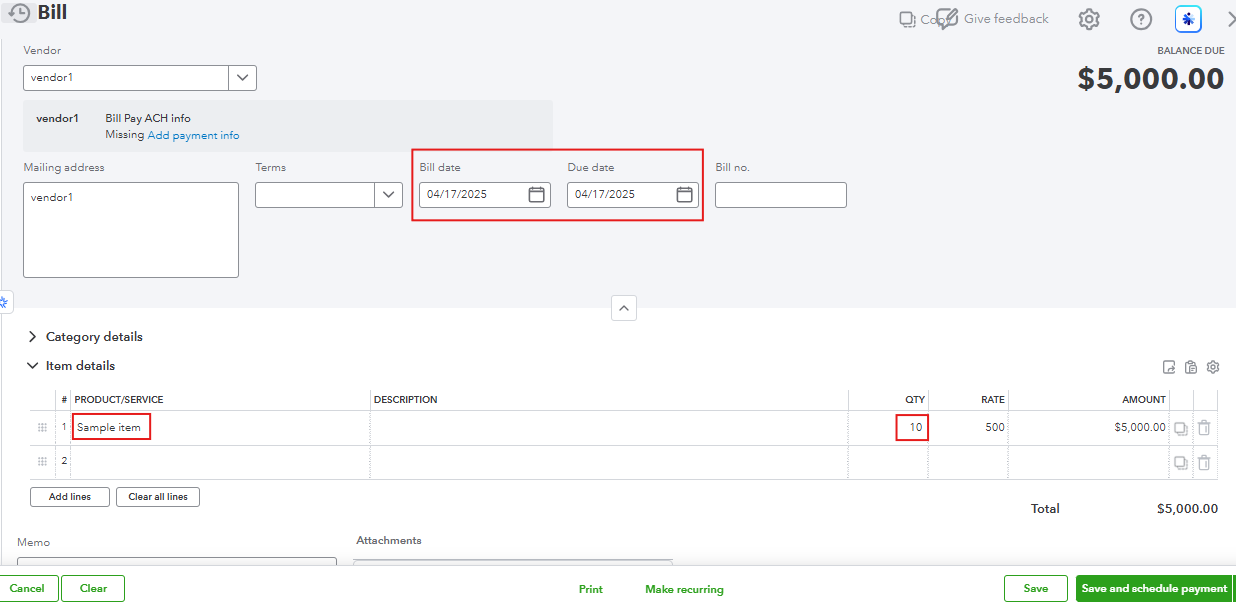
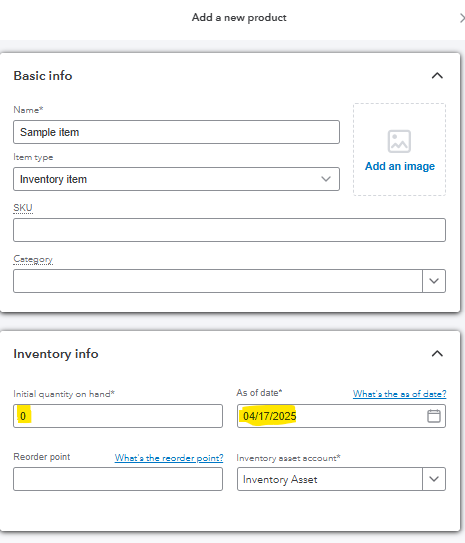
To fix this, you'll need to create a new inventory item dated 04/17/2025, set the quantity to 0. This way, you can enter a bill of your desired quantity, and it will be added to the quantity of the newly added inventory item.


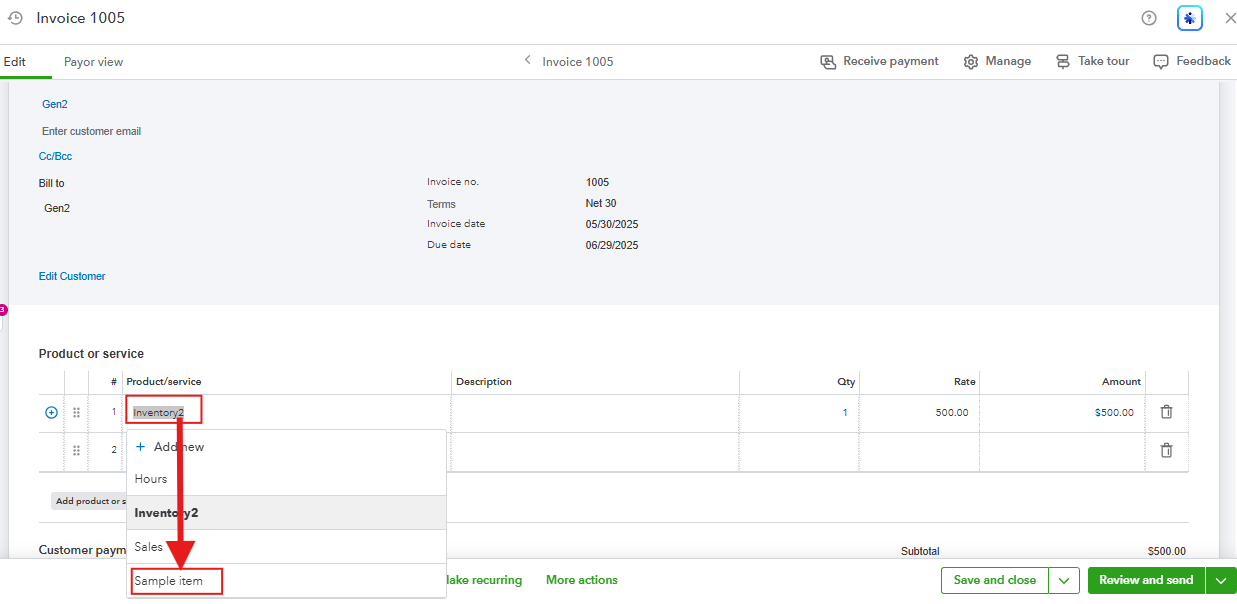
You can check out the screenshots below as a reference:


After creating a bill, edit the invoices from 05/30/2025 and replace the old service/non-inventory items with this new inventory item. Here's how:


  1. Go to the Gear icon, then click Products and services.
  2. Run the same report showing all the invoices from 05/30/2025 to 09/05/2025.
  3. Click each invoice to edit, then replace the inventory item with the newly created item.


Once the history is moved, you can safely remove or inactivate the original item dated 01/31/2026 to avoid future confusion.


Moving forward, it is best to check the starting date of your inventory item before creating any transaction associated with that item to avoid errors and conflicts.


Feel free to go back to this thread if you have more questions. We're always here to help.

13 replies

EduardA
QuickBooks Team
February 2, 2026

Hi there @livepilot, Welcome to the Community.


You can adjust the As of date for the machine in Products and Services to an earlier date to resolve the error. This works because your bill date must be on or after the date you started tracking the quantity on hand of an inventory item in QuickBooks Online (QBO).


The reason some show negative and some show zero is likely due to how the items were created in QBO. Inventory items are tracked and selling more than you have results in a negative balance because the system monitors exact counts. On the other hand, non-inventory items are not tracked and so the quantity remains at zero regardless of how many you sell, as the system does not maintain a running tally.


Here's how to adjust the As of date:


1. Go to All apps.
2. Under Sales & Get Paid, select Products & services.
3. Find the inventory item, and in the Action column, click Edit.
4. Click the Starting value link, then adjust the As of date.
5. Hit Save and close.


If you have any further questions, don’t hesitate to leave a message.

livepilotAuthor
February 2, 2026

Hi EduardA

yes I did find this solution.,  how ever I followed you instructions since it took me there slightly different.  but I get the same error.  I try and put my date as 3/1/2025,  with first sale 5/25/2025 and it give me the out of date   it gives me that until I select the today date.  

livepilotAuthor
February 2, 2026

wanted to show a screen shot of what I have maybe you'll see something.  but also shows the error 

QuickBooks Team
February 2, 2026

Hi there, livepilot.


We appreciate you sharing the screenshot and providing detailed information about the issue. Let's work together to resolve this.


Based on the error message, it appears that the As of date you’ve entered conflicts with one or more transaction dates. This error occurs when the As of date is set to a date later than one or more transaction dates in the system.


To resolve this issue, we recommend checking the earliest transaction date associated with the variant or record. Ensure the As of date is set to before or equal to this earliest transaction date. Modify this accordingly to ensure it aligns with all existing transactions.


You can also consider setting up reorder points to receive notifications when your products are running low or out of stock.


For additional questions or concerns, feel free to leave a reply below.

livepilotAuthor
February 5, 2026

Yes I tried that here is a screen shot of my sales.  is I try and put the date I purchased the good as 4/17/25,  my first sale is 5/25/25 and it gives me the as of date error.  there must be be something else that is wrong.

thanks for the reply!

QuickBooks Team
February 6, 2026

Hi @livepilot,


I just wanted to follow up to check if the resolution we provided helped resolve your issue.


Please let us know if everything is now working as expected or if you're still experiencing any problems.


We'll be glad to assist further if needed.