Solved
At my bank, I have old accounts (closed previously) and new accounts. How do I get QB to ignore the old accounts?
No text available

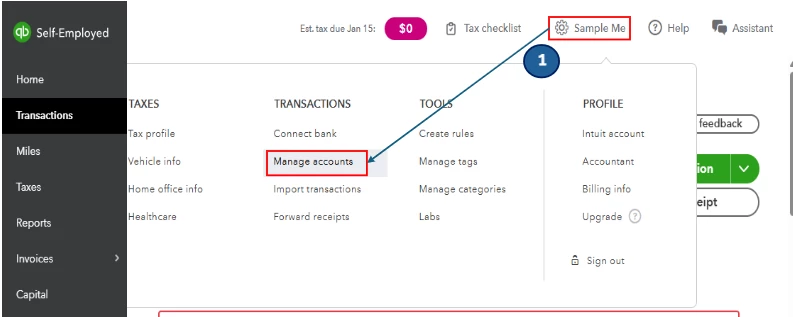
Thanks for the clarification, Max. The steps to ignore old accounts in QuickBooks Self-Employed (QBSE) are different. You'll need to navigate to the Manage accounts menu to complete this task.
The Manage accounts menu is where you can view all your added and connected accounts in QBSE. To exclude the old ones, follow these steps:
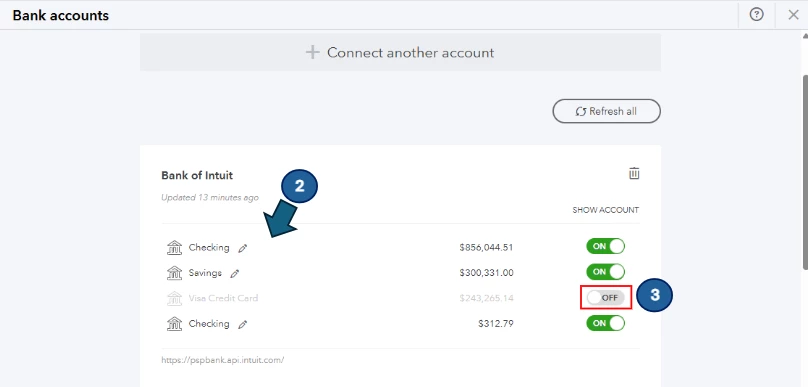
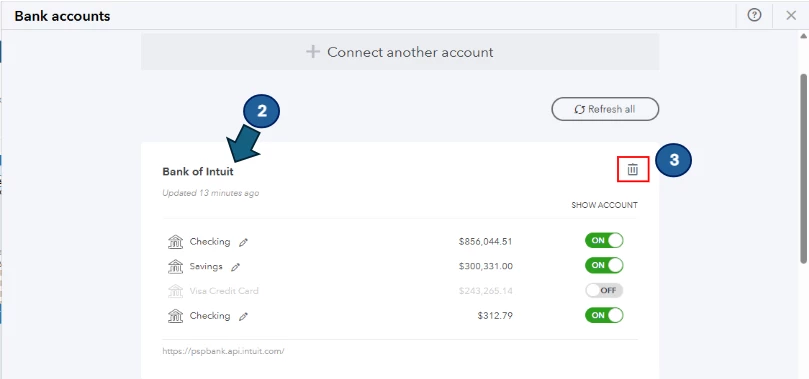
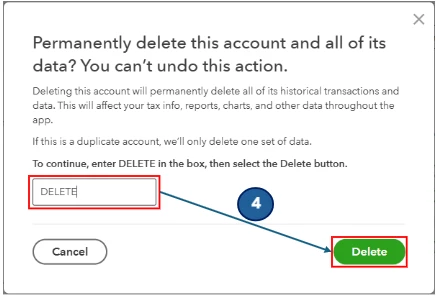
On the other hand, if you want to completely remove an account from the list, you will need to delete it. Please note that this action is permanent, meaning it will erase all historical transactions associated with the account. This may impact your tax information, reports, charts, and other data within the system. To do so, here's how:
Feel free to reach out if you have any additional questions.
Enter your E-mail address. We'll send you an e-mail with instructions to reset your password.