
Get 50% OFF QuickBooks for 3 months*

Buy now
Switch to QuickBooks and 70% off for 3 Months
October 9, 2025
Question

Credit Card Payment With an Open Balance – Weird Match Screen.

  • October 9, 2025
  • 1 reply
  • 3 views

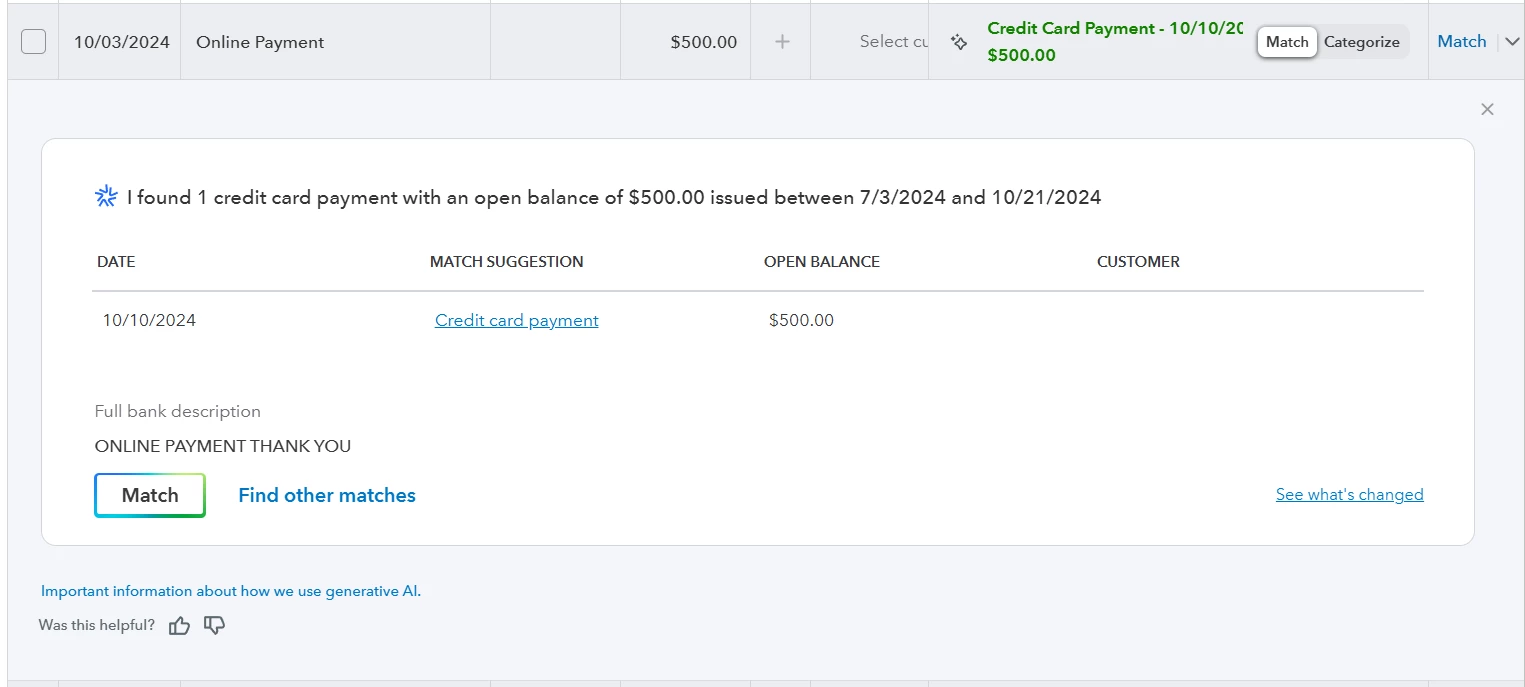
I’m in the Bank Transactions area – looking at my credit card stuff.   Regarding the screen shot below – I already know which account the payment was made from – however QuickBooks presents this ambiguous screen. 


Where are the dropdown menus showing Transaction Type, Account, and From/To?


How can I gain access to these dropdowns so that I can post this transaction? 


Like I said – I already know which accounts this entry belongs to.
 

1 reply

QuickBooks Team
October 9, 2025

Hi there, Peter Vaughn.


We appreciate you reaching out to us. We understand how important it is for you to get your transactions sorted and recorded properly.


QuickBooks (QBO) uses AI to find matches and avoid duplicate transactions. You can toggle between matching and categorizing a transaction by using the switch on the transaction. To view the Dropdown menus, you'll have to change your transaction setting from Match to Categorize.


Please let us know if you have any further questions. We’re always here to help.