
Get 50% OFF QuickBooks for 3 months*

Buy now
Switch to QuickBooks and 70% off for 3 Months
January 8, 2026
Solved

Does anyone facing problem on keyword search? especially on product name?

  • January 8, 2026
  • 2 replies
  • 17 views
No text available
Best answer by Jessavell_A

Good day, @huiling.


Could you please clarify where you are searching for these keywords? Also, could you let me know if you encountered any error messages, or describe what exactly happens when you try to search? Knowing these details will help us narrow down the cause.


If you're using the general search (magnifying glass icon) at the top of your screen, keep in mind that this is a Transaction Search. This feature is designed to locate transactions such as invoices, checks, and payments, so it will only display transaction types, dates, names, etc. It's not intended for finding specific items or products.


To search for a product directly:
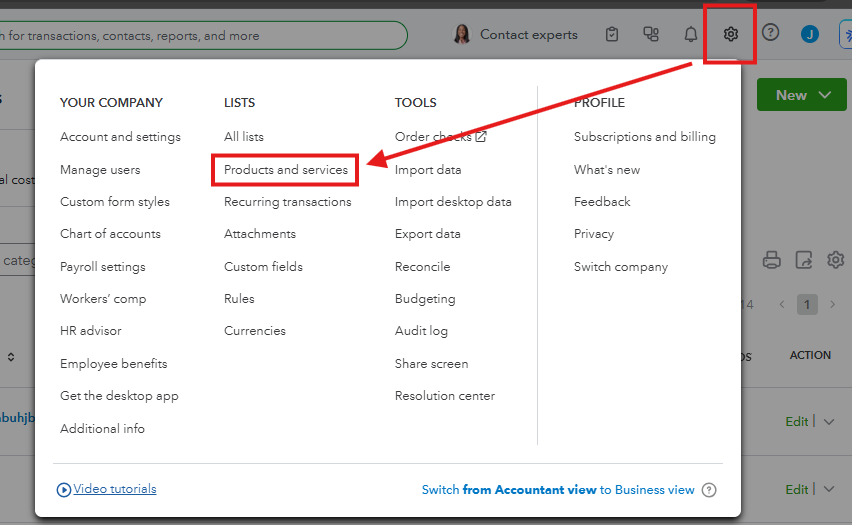
  1. Click the Gear icon in the upper right corner.
  2. Select Products and services.
  3. Use the search bar within this list. This index is much more reliable for locating inventory or service items.


If you are already searching in this bar and some items are still not appearing, they may have been filtered out or marked as inactive. Please ensure that the Status is set to All (not just Active) and the Type is set to All.


If you're referring to something else or have any additional questions, please feel free to reply to this thread.

2 replies

QuickBooks Team
January 8, 2026

Good day, @huiling.


Could you please clarify where you are searching for these keywords? Also, could you let me know if you encountered any error messages, or describe what exactly happens when you try to search? Knowing these details will help us narrow down the cause.


If you're using the general search (magnifying glass icon) at the top of your screen, keep in mind that this is a Transaction Search. This feature is designed to locate transactions such as invoices, checks, and payments, so it will only display transaction types, dates, names, etc. It's not intended for finding specific items or products.


To search for a product directly:
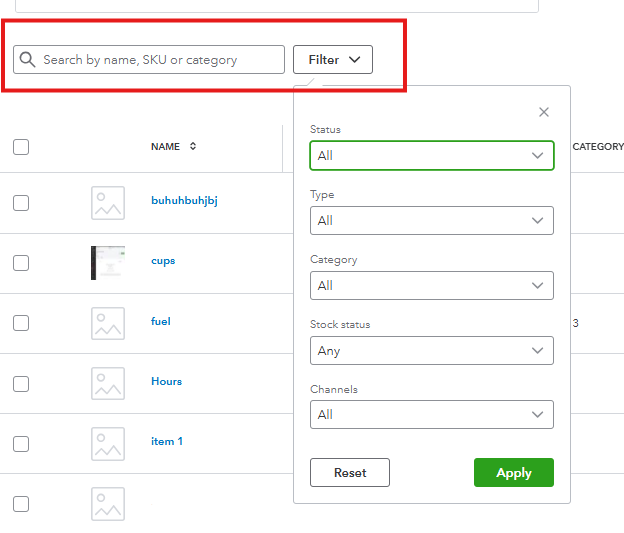
  1. Click the Gear icon in the upper right corner.
  2. Select Products and services.
  3. Use the search bar within this list. This index is much more reliable for locating inventory or service items.


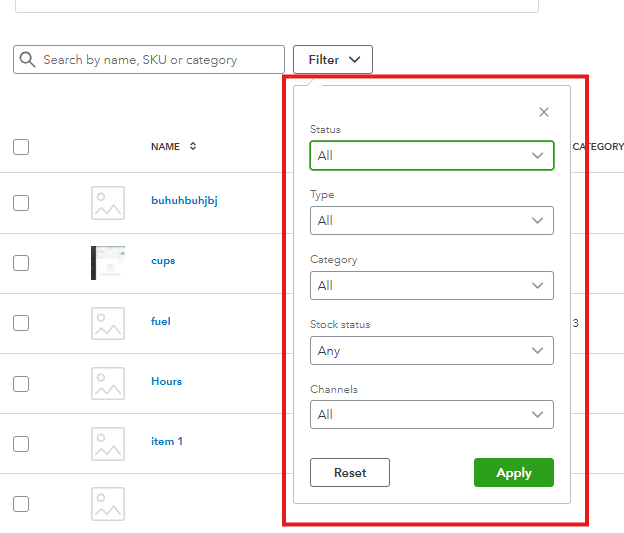
If you are already searching in this bar and some items are still not appearing, they may have been filtered out or marked as inactive. Please ensure that the Status is set to All (not just Active) and the Type is set to All.
 

If you're referring to something else or have any additional questions, please feel free to reply to this thread.

QuickBooks Team
January 9, 2026

Hi @huiling,


I just wanted to follow up to check if the resolution we provided helped resolve your issue.


Please let us know if everything is now working as expected or if you’re still experiencing any problems.


We’ll be glad to assist further if needed.
