
Get 50% OFF QuickBooks for 3 months*

Buy now
Switch to QuickBooks and 70% off for 3 Months
October 24, 2025
Solved

Has anyone applied the credit card processing fees to their customer's invoices? If so, how?

  • October 24, 2025
  • 1 reply
  • 68 views
No text available
Best answer by BonJulius_G

You can apply credit card processing fees to the customers' invoice by manually adding a service item, Shannon.


First, we'll have to create a service item. Here's how:


  1. Click the Gear icon in the upper right corner.
  2. Under the Lists section, select Products and Services.
  3. Click New and choose Service. Name your service (e.g., "Credit Card Fee").
  4. Select the account you want to use to track processing fees.
  5. Click Save and close when you're finished.

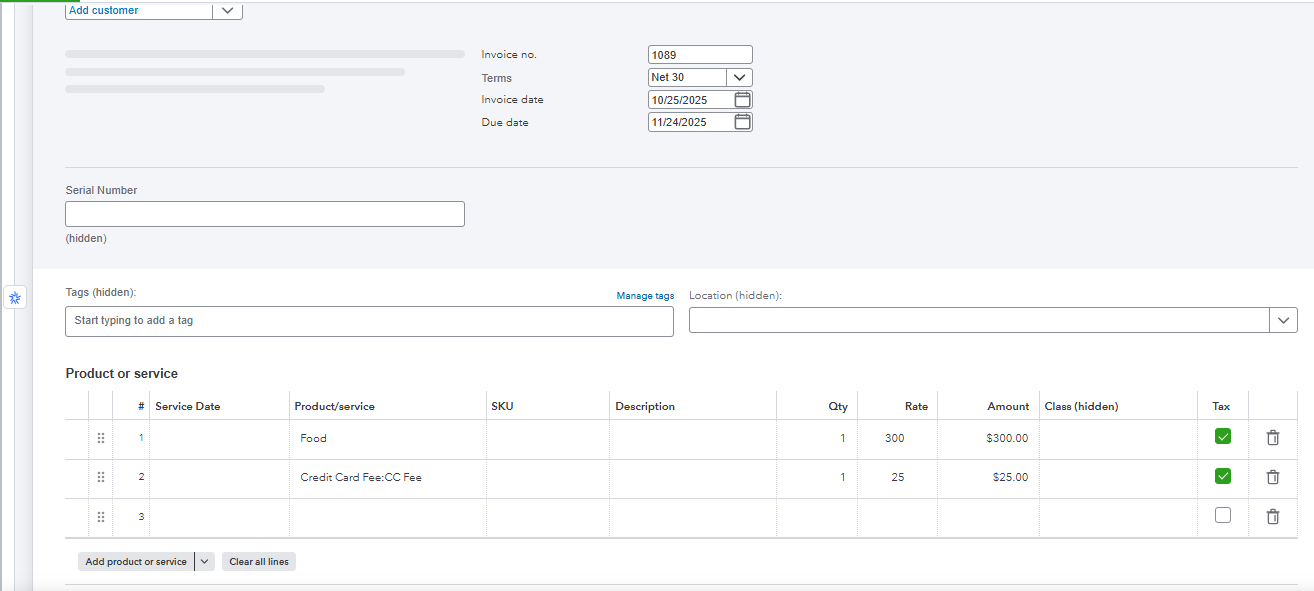
Once done, open your invoice and add the created service item as an additional line on your invoice. Take a look at my screenshot.


For customers paying via ACH bank transfer, you have the option to let them pay the convenience fee automatically.
 

If you have more questions, feel free to reply below.

1 reply

QuickBooks Team
October 24, 2025

You can apply credit card processing fees to the customers' invoice by manually adding a service item, Shannon.


First, we'll have to create a service item. Here's how:


  1. Click the Gear icon in the upper right corner.
  2. Under the Lists section, select Products and Services.
  3. Click New and choose Service. Name your service (e.g., "Credit Card Fee").
  4. Select the account you want to use to track processing fees.
  5. Click Save and close when you're finished.

Once done, open your invoice and add the created service item as an additional line on your invoice. Take a look at my screenshot.


For customers paying via ACH bank transfer, you have the option to let them pay the convenience fee automatically.
 

If you have more questions, feel free to reply below.

QuickBooks Team
October 25, 2025
Hi Shannon, Just checking in to see if the solution we shared worked for you. Did it fix your concern, or are you still having trouble? Happy to help if you need any more assistance!
