
Get 50% OFF QuickBooks for 3 months*

Buy now
Switch to QuickBooks and 70% off for 3 Months
Best answer by EmanE17

Hi there, Casacieloislamujeres.


You can go to the Chart of Accounts to view the expense account and edit its category.


Let me give you the steps on how to do it. Here's how:
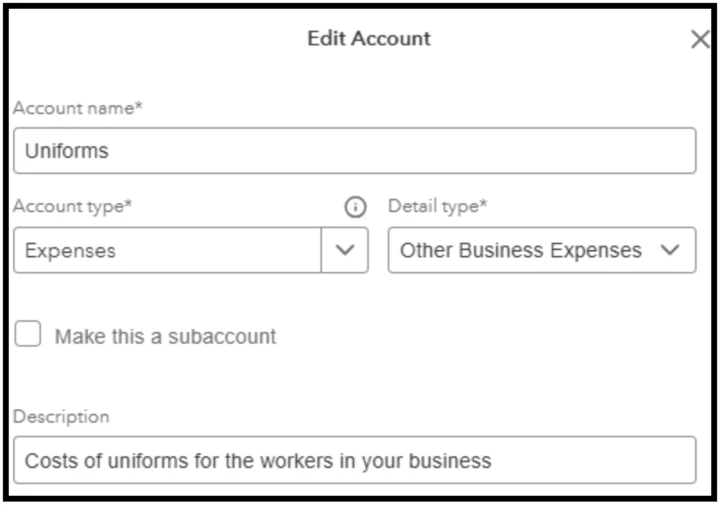
 

  1. Go to the Gear icon and select Chart of Accounts.
  2. Look for the expense category.
  3. Click the drop-down list beside Run report, then select Edit.
  4. From there, you can modify the name, detail type, or description.


  5. Once done, click Save.


Additionally, please note that there are default and special accounts that cannot be edited or deleted. Refer to this guide for more information: Manage default and special accounts in your QuickBooks Online chart of accounts.


Feel free to leave a response below or come back to visit us if you need any further assistance.

1 reply

EmanE17QuickBooks TeamAnswer
QuickBooks Team
January 16, 2026

Hi there, Casacieloislamujeres.


You can go to the Chart of Accounts to view the expense account and edit its category.


Let me give you the steps on how to do it. Here's how:


  1. Go to the Gear icon and select Chart of Accounts.
  2. Look for the expense category.
  3. Click the drop-down list beside Run report, then select Edit.
  4. From there, you can modify the name, detail type, or description.


  5. Once done, click Save.


Additionally, please note that there are default and special accounts that cannot be edited or deleted. Refer to this guide for more information: Manage default and special accounts in your QuickBooks Online chart of accounts.


Feel free to leave a response below or come back to visit us if you need any further assistance.

January 17, 2026

Thank you!
