

Get 50% OFF QuickBooks for 3 months*

Buy now
Switch to QuickBooks and 70% off for 3 Months
BigRedConsulting
Level 15
May 7, 2025
Question

How do I enter terms with discounts?

  • May 7, 2025
  • 2 replies
  • 38 views

The Terms List report includes discount columns:
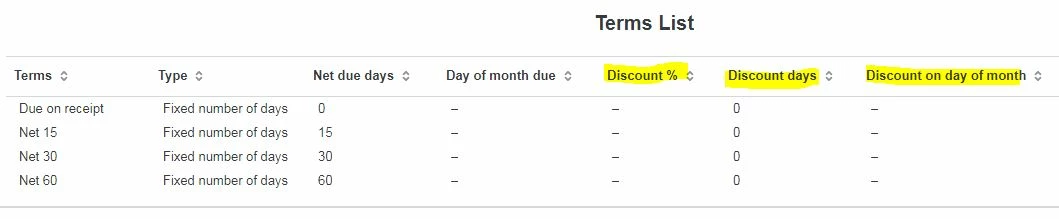
However, when I edit or add terms, the fields aren't there:
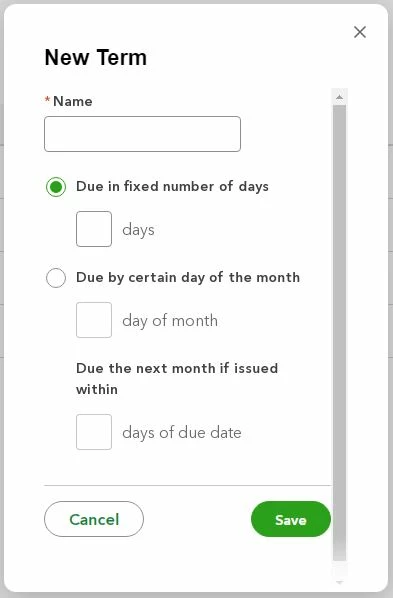
 

So, how do I create a terms record with a discount percentage and period so I can offer my customers early payment discounts, like in QuickBooks Desktop?

2 replies

Rainflurry
Level 11
May 7, 2025

@BigRedConsulting 


You can create terms such as 5% 10 Net 30, and add that to your customer's invoice, but there's nowhere to list the discount percent when creating the terms, and QB Online doesn't have a Discounts and Credits feature that automatically calculates the discount based on the payment received date like Desktop.  If that's not bad enough, the 'Discount %' column on the terms list report is irrelevant AFAIK.  Don't you just love it?

Rainflurry
Level 11
May 7, 2025

On the plus side, QB Online has a separate service date on the invoice that allows individual line items to hit financial statements separately from the invoice date, while still preserving the customer's terms based on the invoice date - an issue with Desktop that has been brought up with some regularity on this forum.  

Moderator
May 8, 2025

Hey there @BigRedConsulting!
:wave:

Thanks for bringing up the early payment discount feature you're familiar with in QuickBooks Desktop.


While QuickBooks Online lets you select payment terms, the direct, automatic application of discount percentages and periods tied to those terms isn't a built-in feature right now.


You can definitely still offer discounts in QBO! You can apply them directly to invoices or when you receive payments. It's just a slightly different workflow than what you might be used to in Desktop.


We always appreciate your feedback as it helps us make QuickBooks even better. If you'd like to see this feature in the future, please send your suggestion through the Gear icon > Feedback in your QBO account. We're always listening!