Solved
How do I get an excluded transaction back? Excluded by accident
Can you reverse an excluded transaction?

Can you reverse an excluded transaction?
You can easily restore excluded transactions by undoing them in the Excluded tab, @tcrowder5.
Here's how:
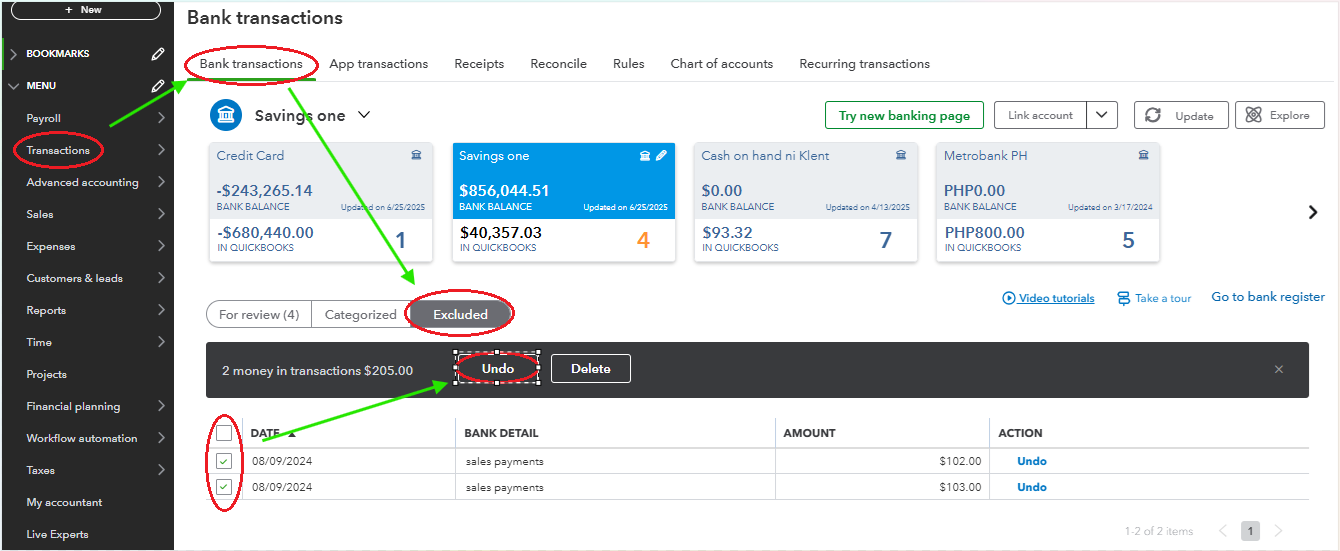
Once you undo the exclusion, the transactions will move back to the For Review tab, where you can categorize and manage them as needed.
To maintain organized transactions and ensure accuracy, we recommend reconciling your account regularly. Check out this helpful resource: Reconcile an account in QuickBooks Online.
For personalized support to optimize your use of QuickBooks and improve your reporting, feel free to reach out to our Live Expert Assisted team. They’ll provide step-by-step guidance and ensure you have confidence in managing QuickBooks efficiently.
By following these steps, you can restore excluded transactions in QBO. If you experience any challenges or have further questions, don’t hesitate to reach out, we’re here to help.
Enter your E-mail address. We'll send you an e-mail with instructions to reset your password.