
SUMMER SAVINGS 90% OFF QuickBooks for 3 months* Ends 8/27

Buy now
Switch to QuickBooks and 70% off for 3 Months
New Member
February 5, 2026
Solved

How do I stop pop-up messages in QuickBooks Online?

  • February 5, 2026
  • 2 replies
  • 37 views

Lately in QBO, Intuit tries adding new features by introducing them via popup messages. I find it very annoying and would like to stop them.

Best answer by Bryan_M

Yes, there's a way to stop the pop-up messages in QBO by modifying your Marketing Preferences section, @graphicsetc.

Here's how:
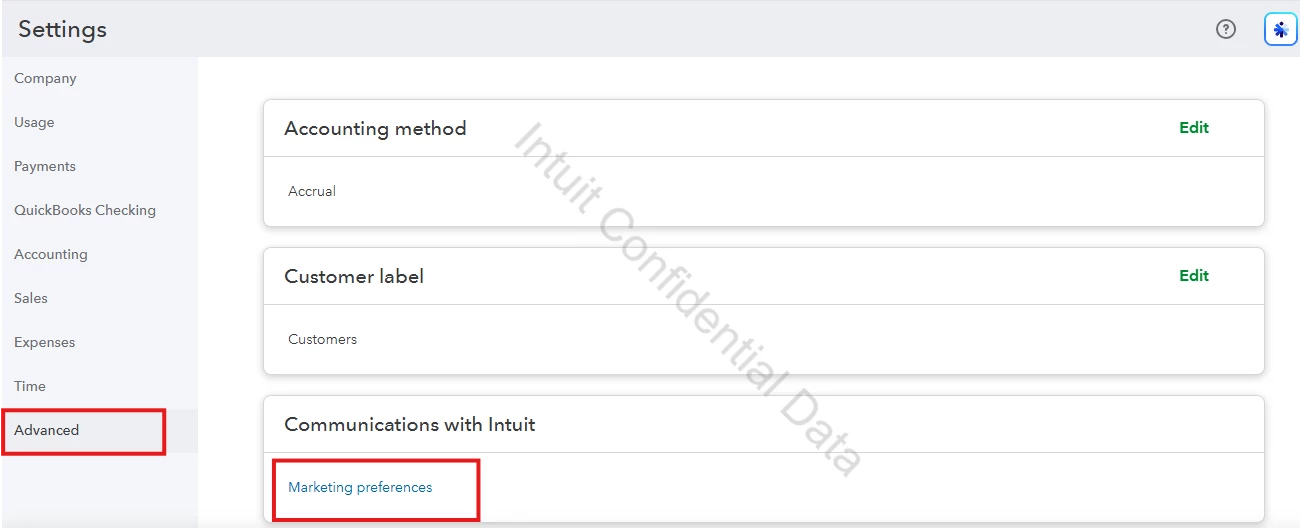
  1. Go to the Gear icon and select Account and Settings.
  2. Move to the Advanced option below.
  3. Click Marketing preferences from the Communications with Intuit section.
    121013iAB6EC3CD76384403.png
  4. Hover your cursor over the Preferences.
  5. Scroll down until it reaches the Personalized ads field.
  6. Switch off the Intuit products and services and the Third-party products and services button on the right side.
  7. You'll see a message above indicating "Your preferences have been saved. This change takes effect in 48 hours."
    121014iFD329DEE934DB649.png

Another option if still showing, is to dismiss the pop-up by clicking the X button or Don't show again option if available on the pop-up itself.
 

If you have additional questions, leave a reply below. We'll assist you as soon as possible.

2 replies

Bryan_M
Bryan_MQuickBooks TeamAnswer
QuickBooks Team
February 5, 2026

Yes, there's a way to stop the pop-up messages in QBO by modifying your Marketing Preferences section, @graphicsetc.

Here's how:
  1. Go to the Gear icon and select Account and Settings.
  2. Move to the Advanced option below.
  3. Click Marketing preferences from the Communications with Intuit section.
    121013iAB6EC3CD76384403.png
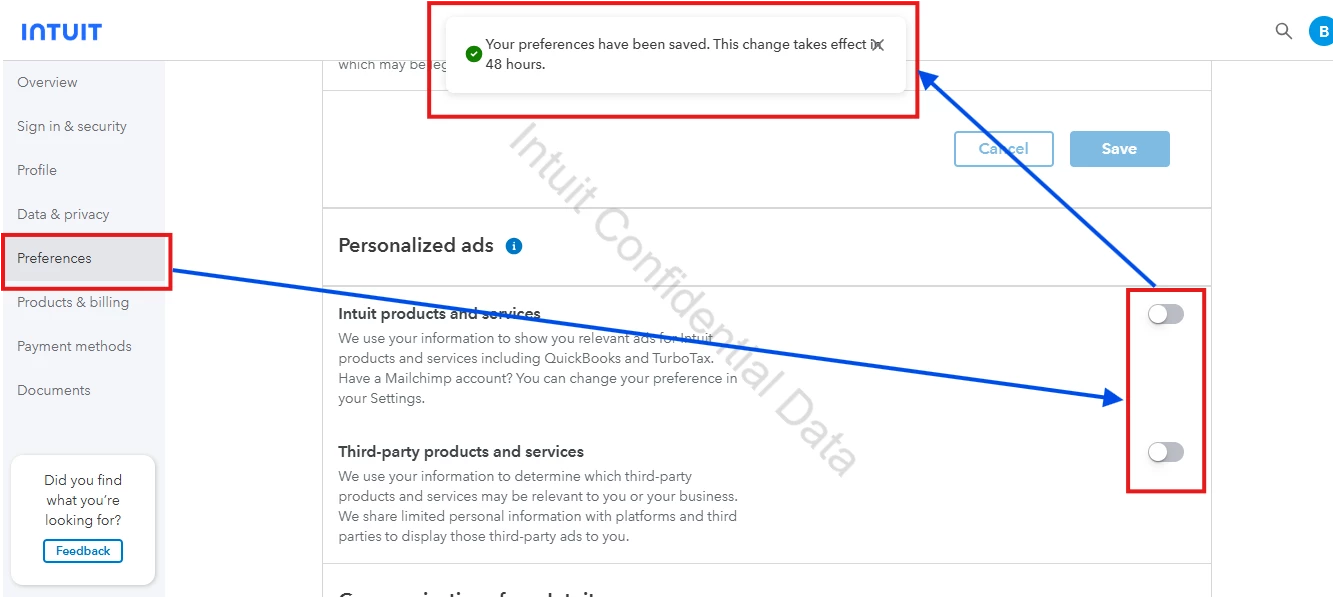
  4. Hover your cursor over the Preferences.
  5. Scroll down until it reaches the Personalized ads field.
  6. Switch off the Intuit products and services and the Third-party products and services button on the right side.
  7. You'll see a message above indicating "Your preferences have been saved. This change takes effect in 48 hours."
    121014iFD329DEE934DB649.png

Another option if still showing, is to dismiss the pop-up by clicking the X button or Don't show again option if available on the pop-up itself.
 

If you have additional questions, leave a reply below. We'll assist you as soon as possible.

Bryan_M
QuickBooks Team
February 7, 2026

Hi there, @graphicsetc.


I just wanted to follow up to check if the resolution we provided helped resolve your issue.
 
Please let us know if everything is now working as expected or if you're still experiencing any problems. We'll be glad to assist further if needed.