
Get 50% OFF QuickBooks for 3 months*

Buy now
Switch to QuickBooks and 70% off for 3 Months
November 3, 2021
Solved

Price Level List

  • November 3, 2021
  • 2 replies
  • 19 views

I'm trying to add Price Levels to QB Enterprise.  It says that I need to be in single-user mode to create a new Price Level List.  Is this correct or is there a setting that I can change?

Best answer by Jen_D

Thanks for sharing your concern with us, @whs37.


To shed some insights, Price Levels/Price Rules can be accessible on both singleuser and multi-user mode. See this link to learn more: Features available and tasks you can perform in single or multi-user mode


If the same prompt happens, we need to forward you over to our technical team so they can help you out with your price list. You may request for a viewing session of needed to help them sort out the problem. Use these steps to contact us: 
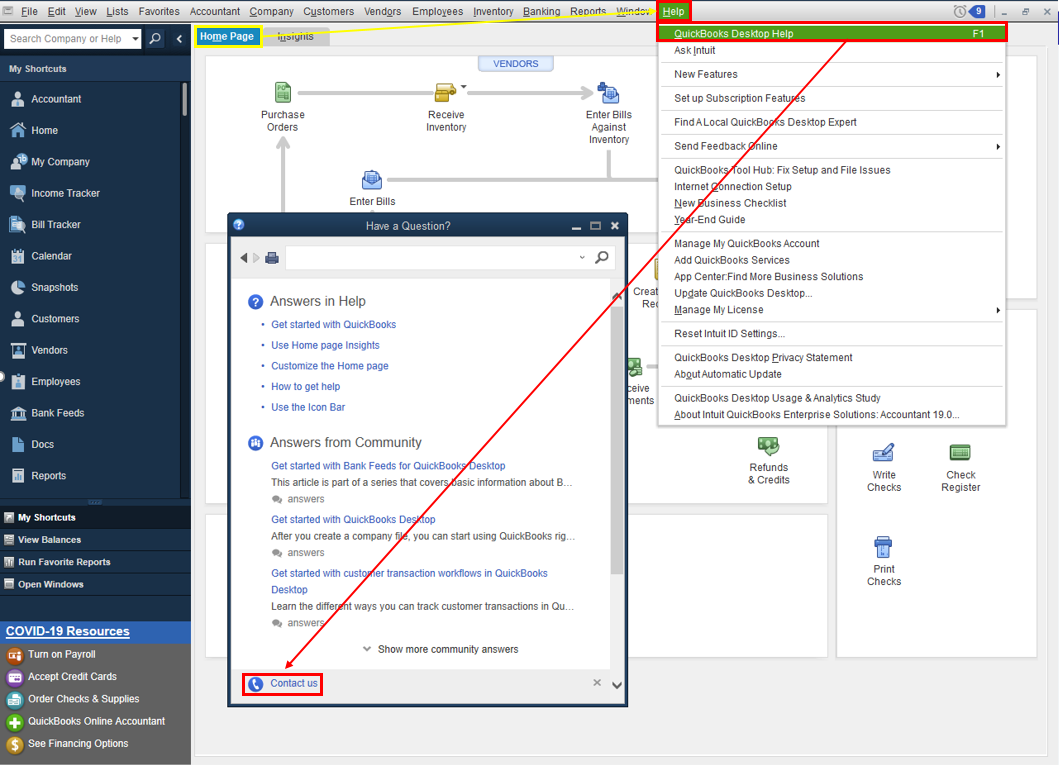
 

  1. Open QuickBooks and click the Help menu.
  2. Select QuickBooks Desktop Help.
  3. On the pop-up screen select Contact us.
  4. Click the Search for Something else button then type your concern in the Ask us anything box.
  5. Hit Search then scroll down to get your contact options.


Refer to this article to learn more about our contact options and support availability: Contact QuickBooks Desktop support


I want to make sure you're taken care of, please come back here anytime for other concerns. I'll be right here if you need other help with QuickBooks. Have a good one.

2 replies

Jen_D
Jen_DAnswer
Level 8
November 3, 2021

Thanks for sharing your concern with us, @whs37.


To shed some insights, Price Levels/Price Rules can be accessible on both singleuser and multi-user mode. See this link to learn more: Features available and tasks you can perform in single or multi-user mode


If the same prompt happens, we need to forward you over to our technical team so they can help you out with your price list. You may request for a viewing session of needed to help them sort out the problem. Use these steps to contact us: 


  1. Open QuickBooks and click the Help menu.
  2. Select QuickBooks Desktop Help.
  3. On the pop-up screen select Contact us.
  4. Click the Search for Something else button then type your concern in the Ask us anything box.
  5. Hit Search then scroll down to get your contact options.


Refer to this article to learn more about our contact options and support availability: Contact QuickBooks Desktop support


I want to make sure you're taken care of, please come back here anytime for other concerns. I'll be right here if you need other help with QuickBooks. Have a good one.

June 13, 2025

Can anyone tell me why when you go into edit a price level list QB makes you scroll to the item number to make the change?  Why can't you just type in the item number to avoid all the scrolling.  Am I missing something.  We sell 40,000 items and it is a pain.