Hi there! Thanks for that information, I wish it was that easy.. Here is what I am looking for so my apologies if I made confusion along with my request.
I have invoices that were paid to me - positive transactions - that when I go into my transactions that are unreviewed or reviewed, they are not pulling into at all. The only transactions that are showing are my payments I am making to subscriptions, contract labor etc. Reviewing all of my transactions, it shows that from January 2025, none of my invoices that were paid from my clients to me are pulling into my transactions, therefore are not showing up in my PnL.
I hope that makes more sense and helps with where I am unsure how this is all of a sudden occurring... and not sure where to go from here.
I appreciate your thorough explanation of your concerns and for checking the reviewed and unreviewed transactions, Jennifer. Let's manually use the Refresh All feature in QuickBooks Self-Employed (QBSE) to ensure all your clients' invoice payments are synced and visible in the system.
Here's a sample screenshot on how to achieve this:
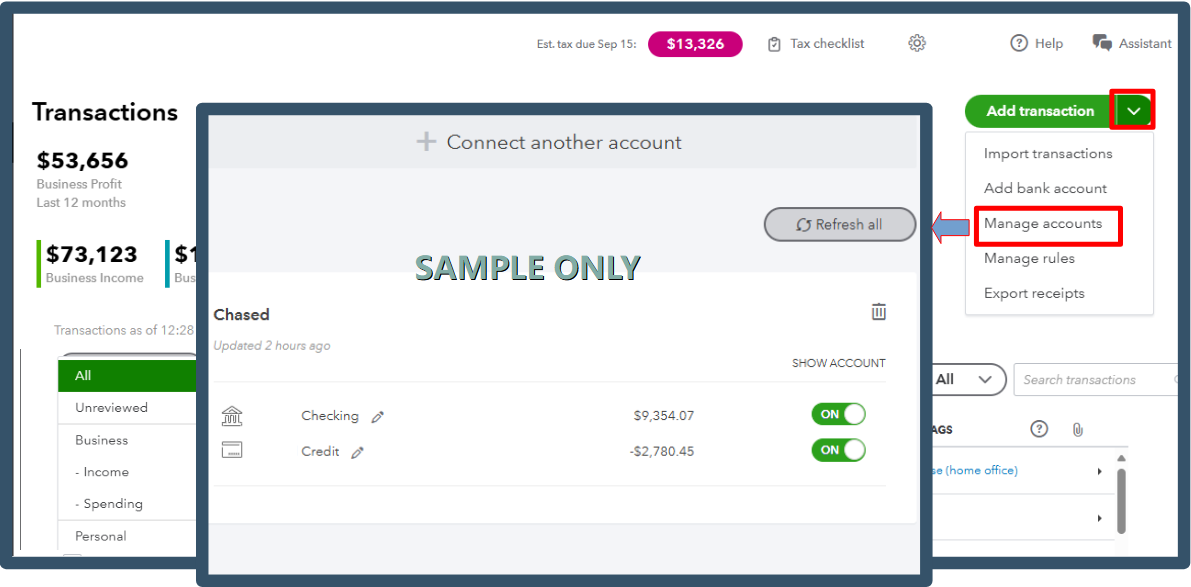
If the issue persists, I recommend contacting your financial institution to check if any restrictions or maintenance updates are affecting the connection between them and QuickBooks. Please know that we rely entirely on the transactions sent by your bank.
Once the bank confirms everything is in order on their end, and considering that this issue has persisted since January, I recommend contacting our live support team for further assistance.
While I'd love to help you directly, our team of experts can investigate this matter more thoroughly to ensure that payments from your clients appear on your Transactions page.
Here's how to reach them:
- Go to the Help icon, then select Contact Us.
- Input the issue you're encountering in the box provided and click Continue.
- Choose the Callback option.
For successful communication, please refer to this article for our support hours: Get Help with QuickBooks Products and Services.
This thread will remain open if you have more questions. We're always here to assist.

