
Get 50% OFF QuickBooks for 3 months*

Buy now
Switch to QuickBooks and 70% off for 3 Months
July 29, 2025
Solved

Transaction types

  • July 29, 2025
  • 1 reply
  • 7 views

There are only 5 options for transactions types on the Batch Enter transactions feature. Can more be added?

Best answer by MsNorthPND1881

This feature is preconfigured by QuickBooks, and at this time, additional transaction types cannot be added to the Batch Enter Transactions feature in QuickBooks Desktop (QBDT), Philslofo.


We encourage you to share your feedback with our product development team. Your insights are highly valued, and your suggestions for adding more transaction types would help us enhance the product.


Here’s how you can submit your feedback:
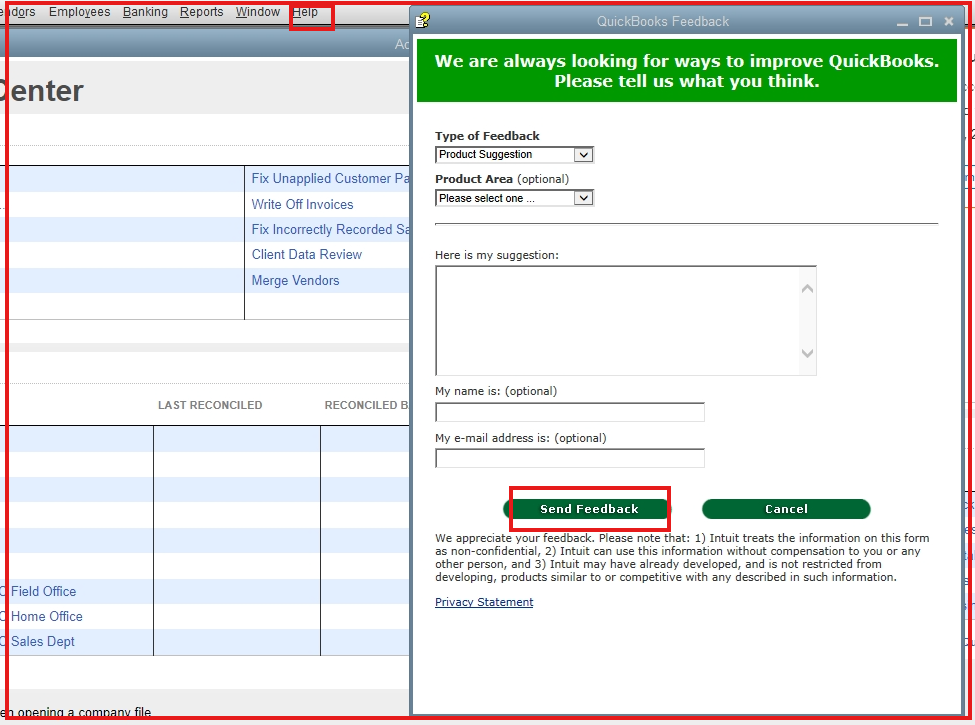
 

  1. Navigate to the Help option.
  2. Choose the Send Feedback Online option.
  3. Select Product Suggestion. On the pop-up display, enter your feedback suggestion.
  4. Click the Send Feedback button, then send.


If you're exploring alternatives, you may want to consider using a third-party app that enables the import of additional transaction types beyond the five options. Also, if your data is formatted in an IIF file, you can import it into QuickBooks. For further guidance, check this resource: Improved IIF Import in QuickBooks 2019 and later.


Additionally, refer to this article if you need to back up your company file: Back up your QuickBooks Desktop company file.


If you have other questions about transaction types, please let us know.

1 reply

MsNorthPND1881
QuickBooks Team
July 29, 2025

This feature is preconfigured by QuickBooks, and at this time, additional transaction types cannot be added to the Batch Enter Transactions feature in QuickBooks Desktop (QBDT), Philslofo.


We encourage you to share your feedback with our product development team. Your insights are highly valued, and your suggestions for adding more transaction types would help us enhance the product.


Here’s how you can submit your feedback:


  1. Navigate to the Help option.
  2. Choose the Send Feedback Online option.
  3. Select Product Suggestion. On the pop-up display, enter your feedback suggestion.
  4. Click the Send Feedback button, then send.


If you're exploring alternatives, you may want to consider using a third-party app that enables the import of additional transaction types beyond the five options. Also, if your data is formatted in an IIF file, you can import it into QuickBooks. For further guidance, check this resource: Improved IIF Import in QuickBooks 2019 and later.


Additionally, refer to this article if you need to back up your company file: Back up your QuickBooks Desktop company file.


If you have other questions about transaction types, please let us know.