Solved
want to make existing donor a vendor too
How do I make a donor also into a vendor?

How do I make a donor also into a vendor?
Welcome to the Community, John.
In QuickBooks, you cannot assign both donor and vendor roles to a single profile, as these roles handle different types of transactions and reporting. However, we have a workaround to address this limitation.
You can create a separate profile for your donor and designate it as a vendor. Since QuickBooks does not allow duplicate names, you can modify the vendor profile name slightly by adding a special character or number to differentiate the two profiles. For example: "MyDonor_Vendor" or "MyDonor2."
Here's how:
1. Go to the Expenses & Bills menu.
2. Select Vendors.
3. Click the New Vendor button.
5. Enter the vendor's name. Ensure to use special characters, initials, or numbers. If you use the same name, QuickBooks will show an error message.
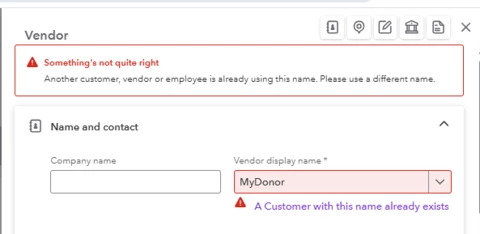
4. Once done, hit Save.
Please know that by creating two separate profiles for the same person or organization (one as a donor and one as a vendor), their transactions will be tracked independently. Donations will appear only in donor-related reports, such as contribution statements, while vendor payments will show up in expense and accounts payable reports. This will ensure your records remain accurate and organized.
Please let me know if you have further concerns.
Enter your E-mail address. We'll send you an e-mail with instructions to reset your password.