Solved
Can I add contractors cash payments for 2025
We started quickbooks in June. Trying to see how to enter cash payments from January-May

We started quickbooks in June. Trying to see how to enter cash payments from January-May
Hello, caringcompanionsbcs.
Yes, you can easily record your contractors’ cash payments for 2025, even for months before you started using QuickBooks Online (QBO), by entering them as backdated checks.
The simplest way is to use the Pay Contractor feature, which will record the payment and ensure it appears on your contractor’s 2025 Form 1099s.
Before you can record payments, you’ll need to create a Contractor profile and set up their W-9. Just click the Add Contractor button on the Contractors page. You can either send the form for them to complete by checking the box to email it, or you can enter their name, address, and W-9 tax information (SSN or EIN) yourself.
Once the profile is complete, you can proceed with recording the payments. You’ll need to record each payment separately using its actual payment date to ensure your records stay accurate and organized.
Here's how:
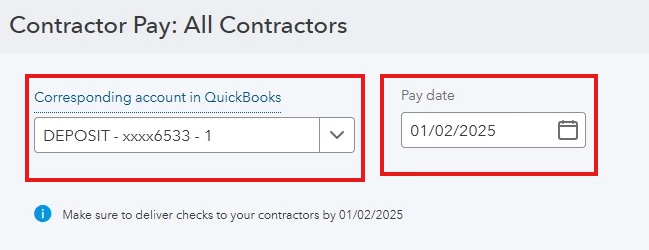
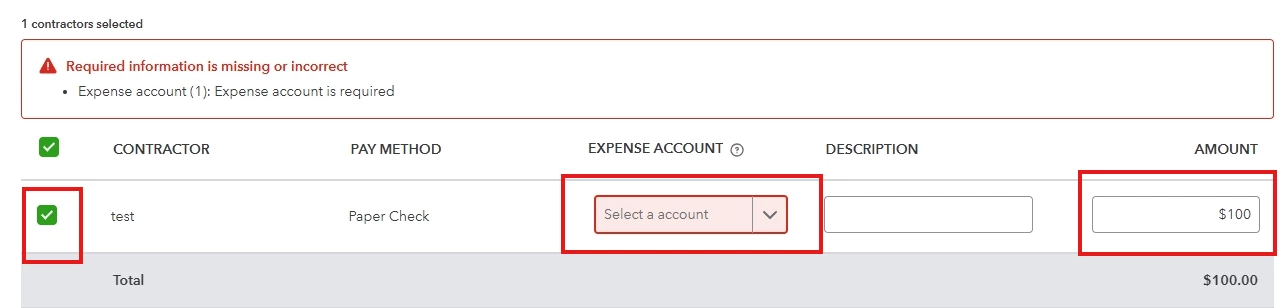
You can also record these payments using the Write Check feature, which functions just like the Pay Contractor option. For detailed, step-by-step instructions, refer to this article: Pay a contractor with a paper check.
If you have any other questions or need more help, don’t hesitate to reach out.
Enter your E-mail address. We'll send you an e-mail with instructions to reset your password.