
Get 50% OFF QuickBooks for 3 months*

Buy now
Switch to QuickBooks and 70% off for 3 Months
July 7, 2025
Solved

Can I take away the Scheduled payment option for the customers?

  • July 7, 2025
  • 1 reply
  • 14 views
No text available
Best answer by JenoP

Yes, you can, pam41.


To do that, you can choose either the Pause or Delete options in the Recurring transactions template for the scheduled invoice. Here's how you can do it:
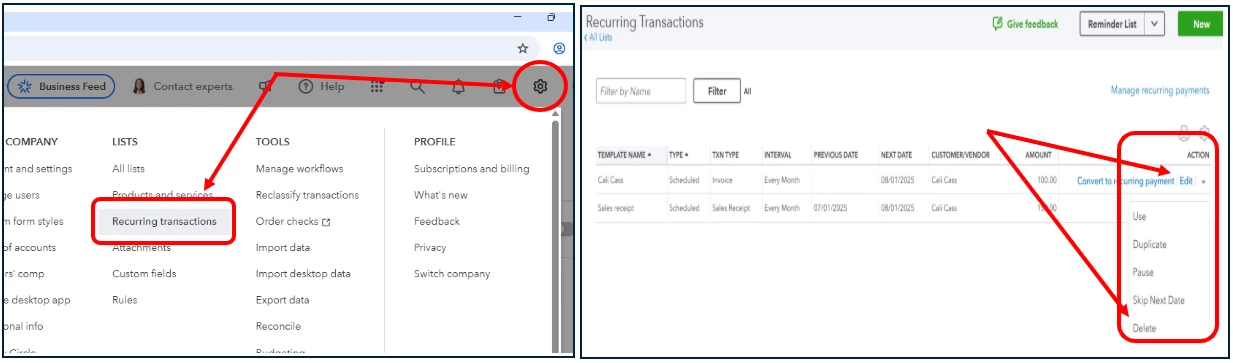
 

  1. Go to the Gear or Settings ⚙ icon and select Recurring Transactions.
  2. Locate the recurring or scheduled invoice that you want to remove.
  3. Click either the Pause or Delete option under the Action column.


Additional details about managing scheduled and recurring customer payments are also discussed here: Set up Autopay for recurring invoices.


We also have our QuickBooks Live Expert Assisted Team that's always ready to lend an extra hand whenever you need personalized help.


Please know that you can tap on us anytime you need help when working in QuickBooks. 

1 reply

JenoP
JenoPQuickBooks TeamAnswer
QuickBooks Team
July 7, 2025

Yes, you can, pam41.


To do that, you can choose either the Pause or Delete options in the Recurring transactions template for the scheduled invoice. Here's how you can do it:


  1. Go to the Gear or Settings ⚙ icon and select Recurring Transactions.
  2. Locate the recurring or scheduled invoice that you want to remove.
  3. Click either the Pause or Delete option under the Action column.


Additional details about managing scheduled and recurring customer payments are also discussed here: Set up Autopay for recurring invoices.


We also have our QuickBooks Live Expert Assisted Team that's always ready to lend an extra hand whenever you need personalized help.


Please know that you can tap on us anytime you need help when working in QuickBooks.
