
Get 50% OFF QuickBooks for 3 months*

Buy now
Switch to QuickBooks and 70% off for 3 Months
October 24, 2025
Solved

How do I change the payment method for new invoices so that it defaults to bank and credit card? I don't want for invoices to pre-select Paypal.

  • October 24, 2025
  • 2 replies
  • 56 views
No text available
Best answer by EduardA

You can change the payment method for invoices through the Sales section in Account and settings, Lucy.


Here's how:
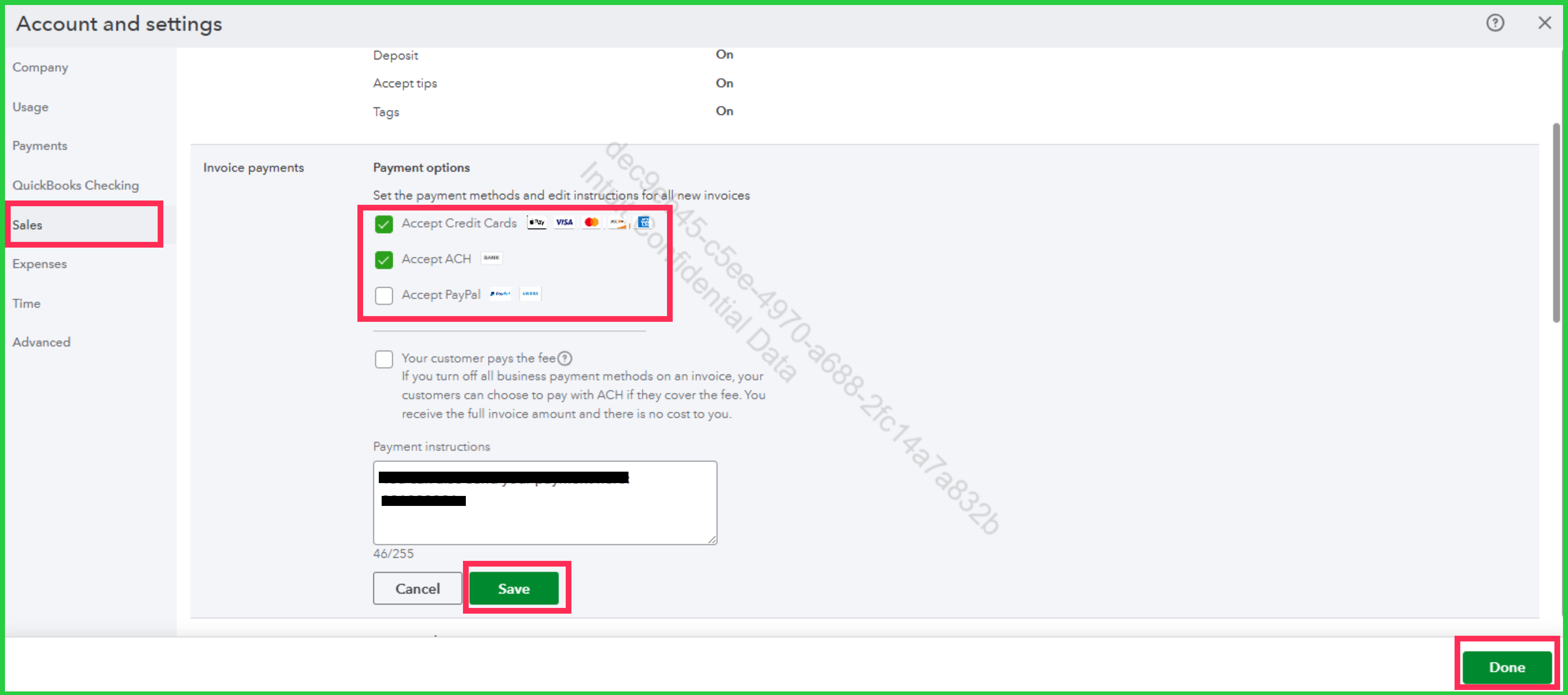
 

  1. Go to the Gear icon, then select Account and settings.
  2. Navigate to the Sales section and click the pencil icon for Invoice payments.
  3. Turn off Accept Paypal, then enable both Accept Credit Cards and Accept ACH options.
  4. Click Save, then hit Done.


Once updated, the payment method will default to bank transfer and credit card every time you create a new invoice.


If you have any other questions or need further assistance, feel free to leave us a message.

2 replies

EduardA
EduardAQuickBooks TeamAnswer
QuickBooks Team
October 24, 2025

You can change the payment method for invoices through the Sales section in Account and settings, Lucy.


Here's how:
 

  1. Go to the Gear icon, then select Account and settings.
  2. Navigate to the Sales section and click the pencil icon for Invoice payments.
  3. Turn off Accept Paypal, then enable both Accept Credit Cards and Accept ACH options.
  4. Click Save, then hit Done.


Once updated, the payment method will default to bank transfer and credit card every time you create a new invoice.


If you have any other questions or need further assistance, feel free to leave us a message.

QuickBooks Team
October 25, 2025

Hi Lucy,


I just wanted to follow up to check if the resolution we provided helped resolve your issue. Please let us know if everything is now working as expected or if you’re still experiencing any problems.


We’ll be glad to assist further if needed.
