
Get 50% OFF QuickBooks for 3 months*

Buy now
Switch to QuickBooks and 70% off for 3 Months
April 14, 2026
Question

How to show only one invoice on payment page

  • April 14, 2026
  • 1 reply
  • 39 views

Hi all,


When a customer opens an invoice via the payment link, they are shown all unpaid invoices for their account. Rather than just the invoice associated with that link.


This is causing confusion. We only want the specific invoice being paid to appear, not the full list of outstanding invoices.


Is there a way to limit the payment screen to just the selected invoice? This is how it was originally for us until it was updated to show all invoices.


Below is an example. Thank you.
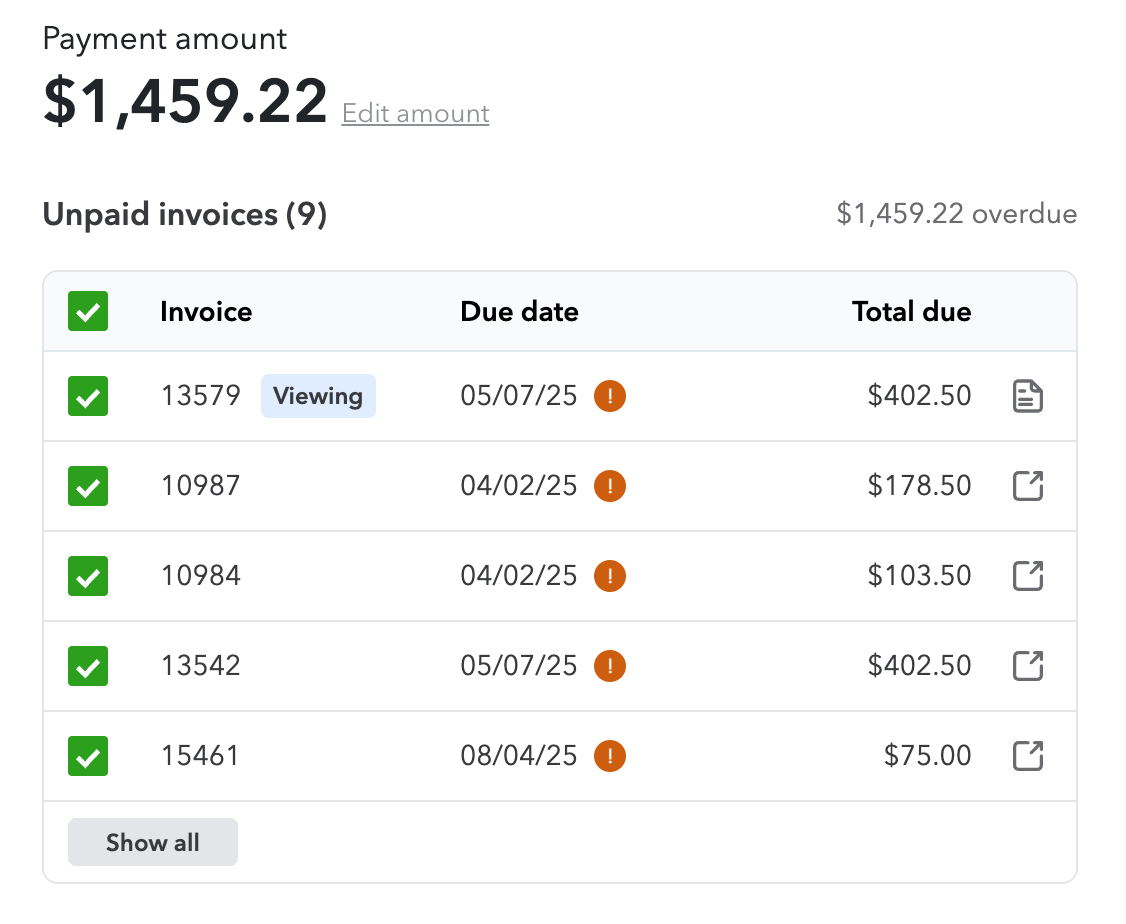
 

All invoices shown

1 reply

QuickBooks Team
April 14, 2026

Hello there, R_Wolf. I appreciate you providing that screenshot for clarity. The display of all unpaid invoices when opening a payment link is working as designed. This document aims to provide a clear overview of the account balance during the payment process.


We understand that every workflow is unique. If you would prefer the system to display only individual transactions (as it may have previously done), we encourage you to request a return to individual transaction views through our in-product feedback tool.


To do that, click on the Gear icon > Feedback, then share your ideas about the new interface and click Next to submit. Our product teams review these requests directly to prioritize future updates.


Don't hesitate to comment below if there is anything else I can assist you with. 

May 4, 2026

Hi, I need the same future. My customer need send to invoice to their separate customers and do not want them see other invoices not relavant.

QuickBooks Team
May 4, 2026

I noticed that one of my colleagues has already shared an efficient solution to address your issue. To make this easier, I’ve included the link to their suggestion here: I don't want customers to see all unpaid invoices in the payment page.


If you have any additional questions, please don't hesitate to reply below.