


QuickBooks Product Updates: Helping you simplify your workflow and save time | April 2026

Here's what's new and worth knowing in QuickBooks. From time tracking improvements to free expert onboarding, we've got a few updates to share, plus the latest on Sole Trader Plus if you missed it last month.
[INVOICING]
A more organised way to manage your invoices.
We've made some improvements to the invoicing experience: cleaner, more intuitive, and giving you more control. Here's a quick summary of what's changed:
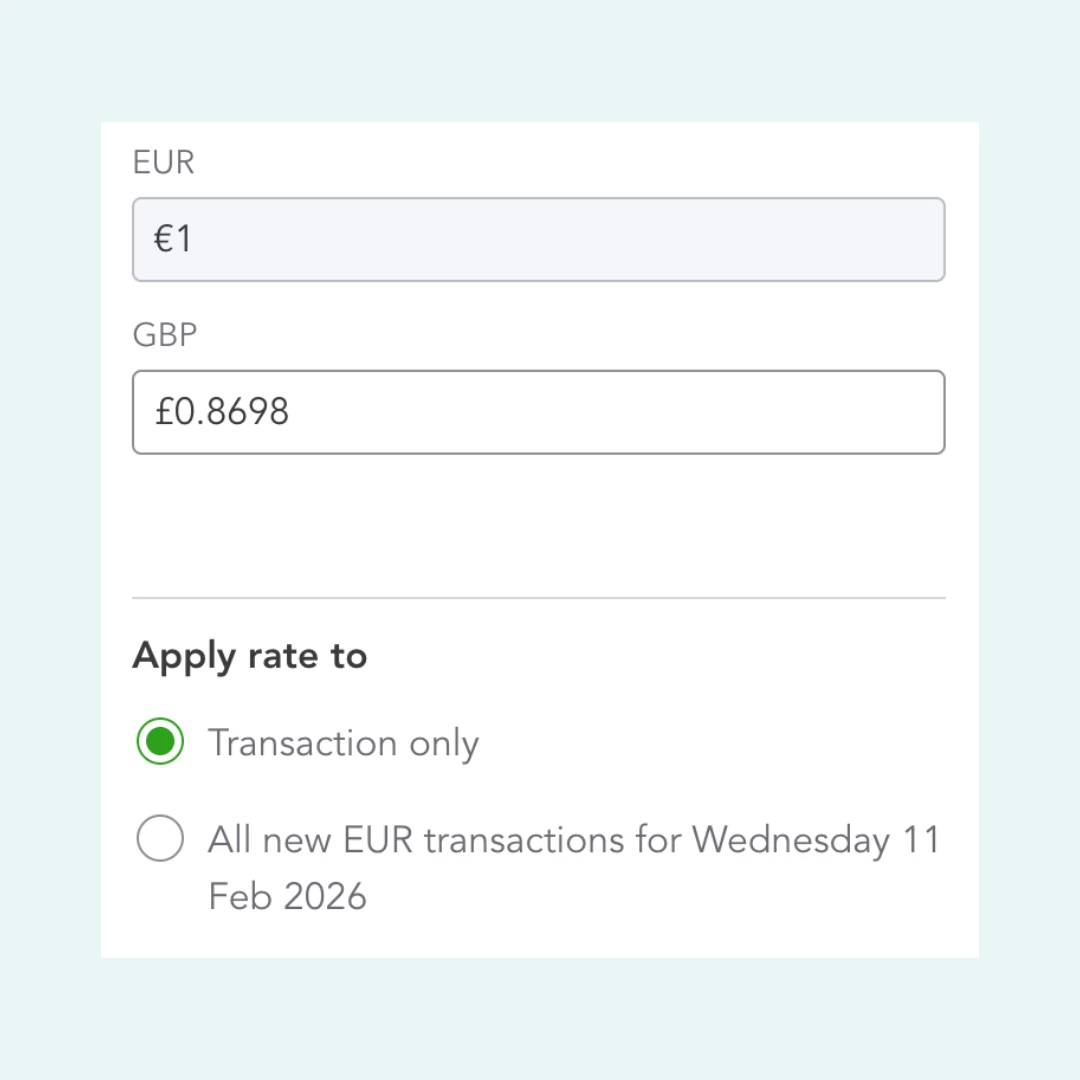
- Managing exchange rates on foreign currency invoices: If you invoice customers in a different currency, exchange rates have moved to a more structured location. You can now choose whether a rate change applies to just one invoice or all transactions in that currency today.
- Send Later and Print Later: These options have moved from checkboxes to toggle switches. Easier to review before you hit send.
- Invoice status tracking: You can now see a clear timeline of invoice activity without leaving the invoice.
- Invoice templates Template options have moved. Switch templates or edit your branding without interrupting your workflow.
Want the full breakdown? Read the full blog post here
[QUICKBOOKS TIME]
Manage time projects directly in QuickBooks Online
Time Projects are now available directly inside QuickBooks Online, enabling customers to create estimates, assign workers, and track project time.
What this means for you
- Create project estimates
- Track time and progress
- Assign workers to projects
- Faster troubleshooting with unified interface
- Reduced admin overhead and more accurate billing
And you'll get real-time visibility into how your project is tracking against budget.
Where to find it:
- Create estimates: Time → Time Projects → Create estimate
- Track time and progress: Time → Time Projects → [Select project]
- Assign workers: Time → Time Projects → [Select project] → Workers
Who's it for?
This is available to customers on QuickBooks Online Time Elite or QuickBooks Online Payroll Elite plans in the UK.
What you need to do:
Rolling out now. If you don't see it yet, it will reach you by mid-May.
[QUICKBOOKS TIME]
Manage overtime policies directly in QuickBooks Online
Overtime policies and alerts can now be set up and managed entirely within QuickBooks Online, no more switching to configure overtime. Better visibility into overtime as it happens means fewer payroll surprises, improved cost control, and less admin cleanup after the fact.
Where to find it:
Overtime policies:
- Accounts & Settings → Time → Overtime
- Time → Assignments → Workers → Overtime
Overtime alerts:
- Accounts & Settings → Time → Notifications → Overtime
- Worker settings → Notifications → Overtime
Who's it for?
Customers on QuickBooks Online Time (Premium or Elite) or QuickBooks Online Payroll (Premium or Elite) in the UK.
What you need to do:
Nothing. This rolled out fully at the start of April.
[GUIDED SET UP]
Did you know you can get FREE 1:1 onboarding with QuickBooks?

If you're new to QuickBooks, we want to make sure you're set up for success from day one, so we're giving you access to a free, personalised onboarding session with a real product expert.
What this means for you
No more guessing where things live or how to get started. Your onboarding session is a chance to ask questions, get set up properly, and start saving time faster.
Who's it for?
This one's for customers who joined us within the last 90 days. So, if you're relatively new here, this is your sign to book now.
What you need to do:
You can find it directly within QuickBooks, or click here to get started.
[SOLE TRADER PLUS]
We shared details on everything you need to know about Sole Trader Plus last month, but we know this is a big change for a lot of you and we wanted to share more. It's designed for self-employed owners, single property landlords, and small businesses without employees.
What this means for you
AI bank feeds, receipt capture, mileage tracking, professional invoicing, CIS support, and app integrations - all in one place.
What you need to do:
Depending on which plan you're currently on, we have a step-by-step help article for you:
Switching from Sole Trader → Sole Trader Plus or QuickBooks Online
Switching from Self-Employed → Sole Trader Plus or QuickBooks Online
[MAKING TAX DIGITAL]
Missed our MTD for Income Tax webinar? Watch it back here. We know Making Tax Digital for Income Tax has raised a lot of questions, so we ran a 60-minute session to answer them.
In the recording you'll find:
- Answers to the most common MTD questions from our community
- A walkthrough of how MTD works inside QuickBooks
- Exactly what you need to do to stay compliant
We’ll continue to share clear, practical updates like these, focusing on changes that make a real difference to how you run your business. Keep an eye out for future posts, and as always, in the comments, let us know what you’d like us to improve next.