


QuickBooks Product Updates: New tools to work smarter this month | May 2026

May's updates are all about working smarter. From AI-powered insights to automated Making Tax Digital compliance checks, QuickBooks is doing more of the heavy lifting so you don't have to. Here's everything you need to know.
[PROJECT MANAGEMENT]
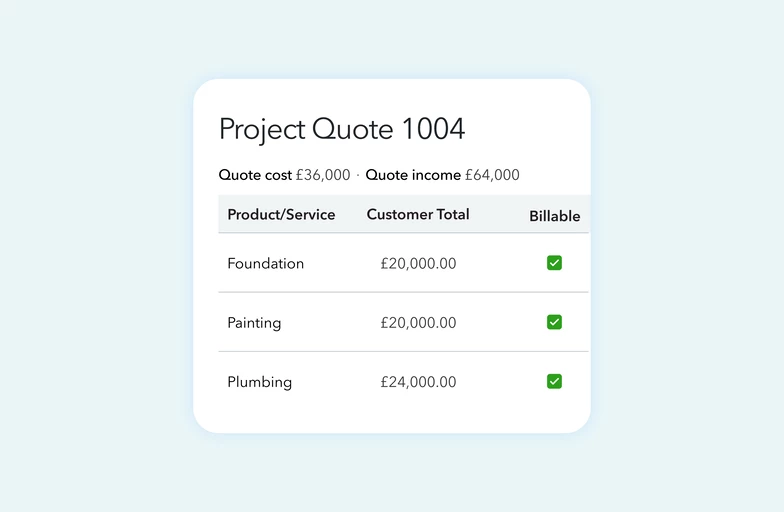
If you manage project-based work, this one's worth knowing about. You can now create detailed project quotes that give you a clear view of anticipated margins before the work even starts.
What this means for you
- Project-specific quotes: Build detailed quotes tied to individual projects, breaking down costs and income by product or service so you can forecast profit margins in one place
- Automated financial tracking: Standard costs and sales rates fill in automatically, saving you time — and you can convert quotes directly into invoices or progress bills, either by percentage or line item
- Real-time performance insights: As work progresses, compare actual income against your original quote to spot issues early and make informed decisions
Who's it for?
Available on Plus and Advanced plans.
[MAKING TAX DIGITAL]
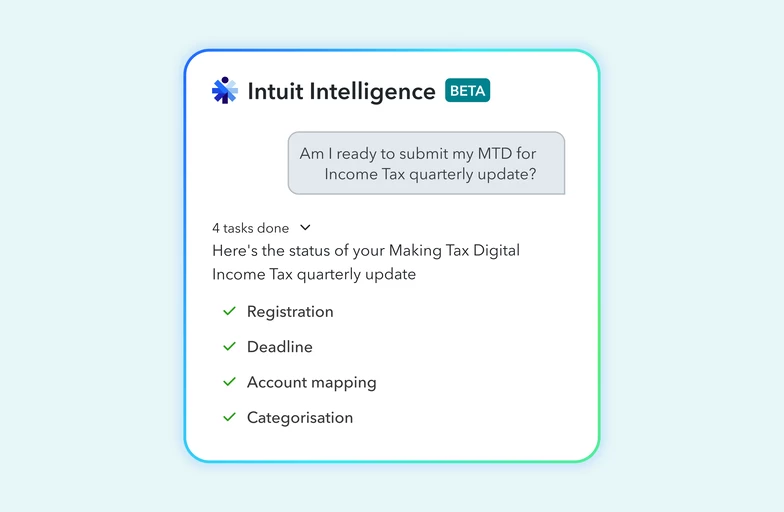
Automate your MTD for Income Tax readiness. If MTD for Income Tax is on your radar, this update is designed to take a lot of the stress out of staying compliant.
What this means for you
- MTD readiness checker: Scans your data for duplicate entries or missing transactions, saving hours of manual reconciliation
- Intelligent COA mapping: Identifies transactions that aren't correctly mapped to HMRC categories so nothing slips through
- Intuit Intelligence chat: Get instant status updates and run readiness checks using simple conversational prompts
- Actionable resolution reports: Receive a clear summary of any issues found, with steps to fix them — including batch updates
Who's it for?
UK-based accountants, bookkeepers, and sole traders on any plan.
[GUIDED SET UP]
Did you know you can get FREE 1:1 onboarding with QuickBooks?
If you're new to QuickBooks, we want to make sure you're set up for success from day one, so we're giving you access to a free, personalised onboarding session with a real product expert.
What this means for you
No more guessing where things live or how to get started. Your onboarding session is a chance to ask questions, get set up properly, and start saving time faster.
Who's it for?
This one's for customers who joined us within the last 90 days. So, if you're relatively new here, this is your sign to book now.
What you need to do:
You can find it directly within QuickBooks, or click here to get started.
[INTUIT ACCOUNTANT SUITE]
Intuit Intelligence is now available in the Intuit Accountant Suite bringing AI directly into your firm and client workflows, so you can spend less time on admin and more time on the strategic work your clients value most.
What this means for you
- AI-powered chat: Get instant, real-time insights based on your firm and client data without digging through reports right from your workflow, no tool switching required
- Clean books without the heavy lifting: Let Intuit AI handle the bulk of categorisation and flag items for your review. Need more info from a client? Send questions and view responses directly in the transaction feed
- Compare data across your client portfolio (coming soon to Accelerate): Ask sophisticated questions across your entire client portfolio and get immediate insights without extensive manual effort
- Generate reports in seconds (coming soon to Accelerate): Use Intuit Intelligence chat to pull specific reports like top expenses or sales trends on demand
Also launching in the Intuit Accountant Suite:
- Requests (Beta): Centralise client communications in one secure place with an organised audit trail — no need for third party tools
- User Groups (Beta): Assign teams and clients in bulk through custom role-based access groups that align to your firm's structure
A few things to know:
- Intuit Intelligence in firm books is available on Core
- Intuit Intelligence in client books requires upgrading to Accelerate
- During the beta period, chat is capped at 200 questions (Core) and 1,000 questions (Accelerate)
[MAKING TAX DIGITAL]
Missed our MTD for Income Tax webinar? Watch it back here. We know Making Tax Digital for Income Tax has raised a lot of questions, so we ran a 60-minute session to answer them.
In the recording you'll find:
- Answers to the most common MTD questions from our community
- A walkthrough of how MTD works inside QuickBooks
- Exactly what you need to do to stay compliant
We’ll continue to share clear, practical updates like these, focusing on changes that make a real difference to how you run your business. Keep an eye out for future posts, and as always, in the comments, let us know what you’d like us to improve next.