
Get 50% OFF QuickBooks for 3 months*

Buy now
Switch to QuickBooks and 70% off for 3 Months
February 27, 2026
Question

payroll mapping items greyed out

  • February 27, 2026
  • 2 replies
  • 12 views

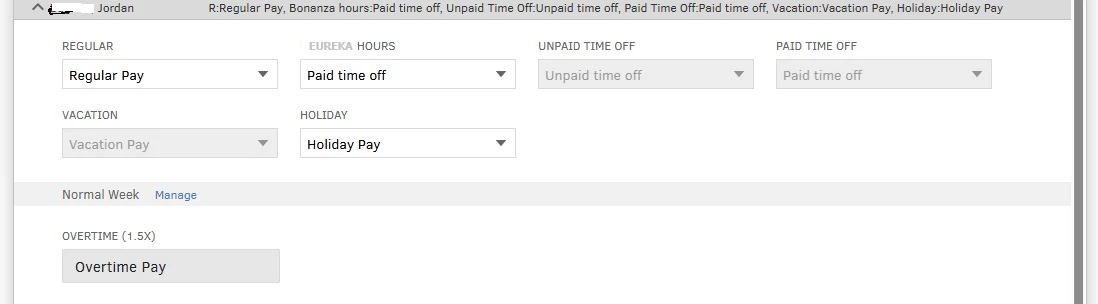
Please look at the attached image.  Why are some of the choices grayed out?

2 replies

Clark_B
QuickBooks Team
February 27, 2026

Hello there, @LDO. The PTOs and vacation pay options are greyed out because they’re set as default once you’ve assigned specific time off for your employees.


Only the selected pay types remain active, as you can select options in the dropdown menu for adjustments. If you want to change the options that are greyed out, you can update your employees’ time off options in QuickBooks Online:


  1. Navigate to the Employees menu and select the specific employee you want to change.
  2. In the Time off section, click Edit.
  3. Adjust the Vacation pay, paid time off, and sick pay to your preference.
  4. Once done, select Save.


Also, consider checking out our QuickBooks Live Expert Assisted team. They can help you with your payroll mapping and transactions.


We’re always here to help you if you have any other concerns.

Clark_B
QuickBooks Team
February 28, 2026
Hi there, @LDO.

I just wanted to follow up to check if the resolution we provided helped resolve your issue. Please let us know if everything is now working as expected or if you’re still experiencing any problems.

We’ll be glad to assist further if needed.