
Get 50% OFF QuickBooks for 3 months*

Buy now
Switch to QuickBooks and 70% off for 3 Months
February 27, 2026
Question

TIME ....identical permissions - but different results

  • February 27, 2026
  • 2 replies
  • 9 views

We do not want any of our shop floor employees to be able to clock in and out  on their mobile device. None of them have permissions  ... but one man did. Here is what happened.   Our kiosk was not working due to internet outage.   William tried clocking in on his phone and he was successful. 


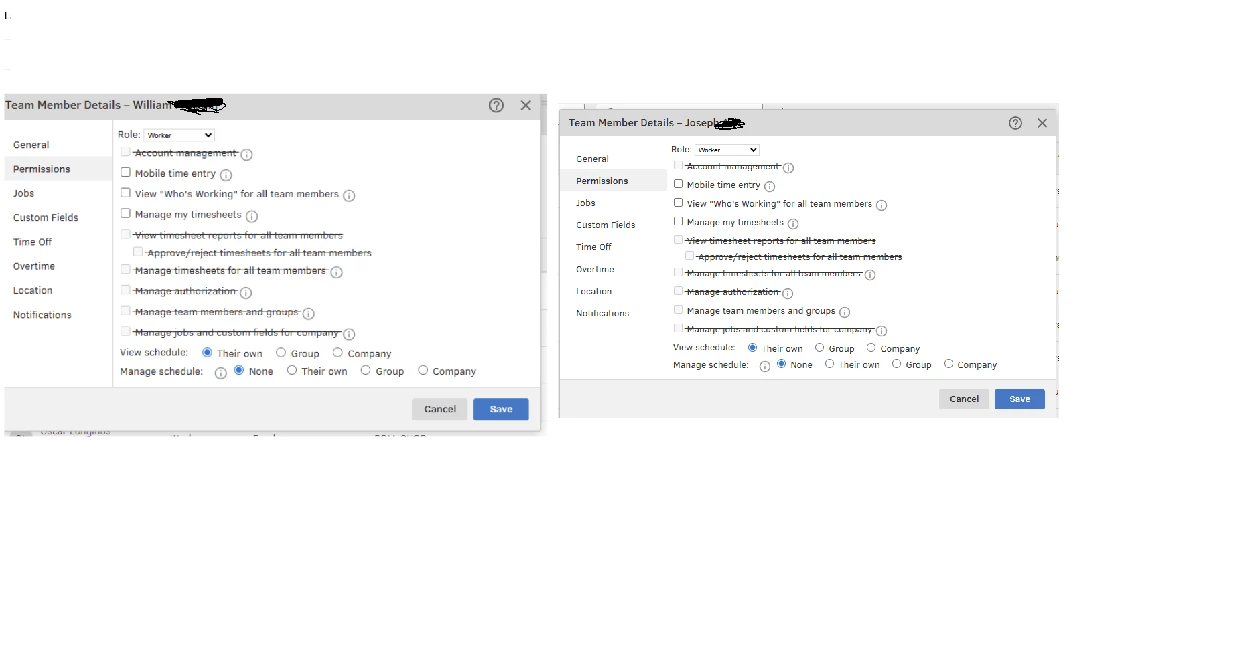
William clocked in on his phone when the tablet was down. But he doesn't have permissions. 
Look at the image below:  It appears William has the same permissions as joseph.  Why can William clock in on his iphone but not Joesph.
Thanks,
LDO 1960 


2 replies

LDOAuthor
February 27, 2026

Please help.  We do not want our  shop employees to be able to clock in and out on their iphone.

Thanks


QuickBooks Team
February 27, 2026

Hi there, @LDO. Since William's permissions and restrictions are not working as expected, I recommend contacting our QuickBooks Time Live Support team. Our Live Support team has the tools required to investigate this unusual behavior in detail and offer recommendations tailored to your situation.


Here’s how to reach them:


  1. Go to the (?) Help button in the top-right corner.
  2. Select the Search tab and fill in keywords describing your concern in the search bar.
  3. Click Contact Us.
  4. Provide a brief description of your concern and Continue.
  5. Choose between Chat with us or Have us call you as your preferred option.
     

You can check our support hours to see when assistance is available and select a time that works best for you.
 

If you have further concerns or clarifications about user permissions, just add a comment below.