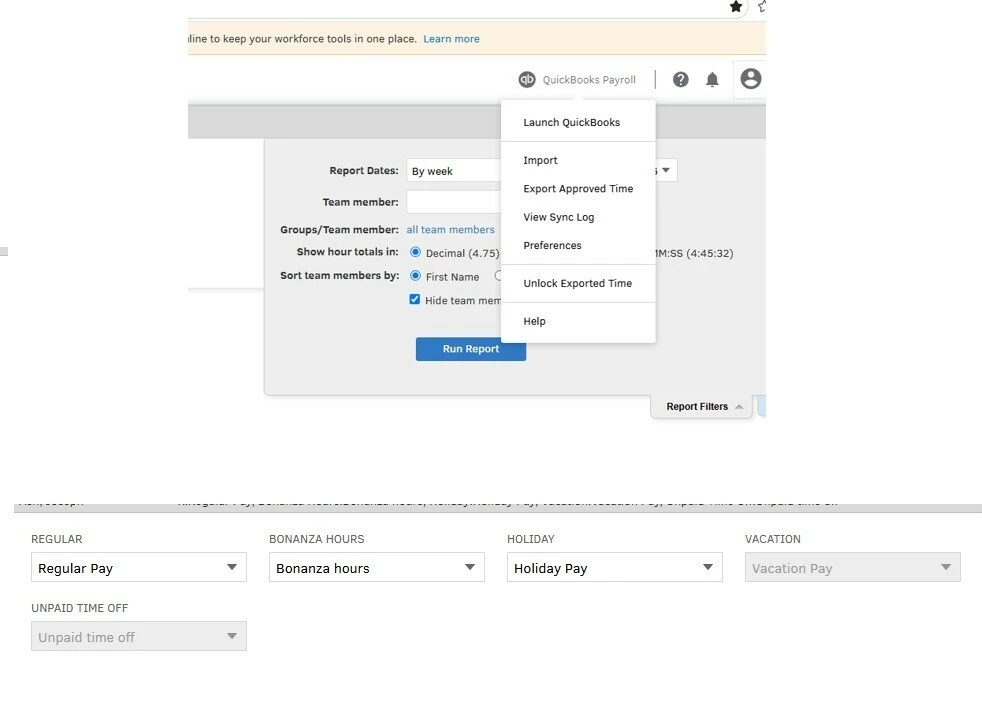
FYI: hours will look correct in TIME but when I export the hours to payroll Bonanza will show up as regular hours. To Fix this I have to go to quickbook classic time>left click Quickbook times Payroll icon.> Preferences > Payroll Item Mapping Tool> and make sure that each pay type is mapped to its respective name.
So why is vacation grayed out in the payroll mapping item tool? so far it doestnt seem to be causing a problem but it the grey is not consistent with the rest of the tool
The Mapping Tool can only display pay types that are already set up and assigned to an employee inside QuickBooks Workforce. When Vacation shows as grayed out, it typically means that the Vacation pay type has not yet been added or assigned to that employee on the QuickBooks Workforce side, so the tool has nothing to map it to.
You can fix this by following these steps:
Go into QBO Payroll and open the affected employee's profile.
Confirm that Vacation is listed as an active pay type and that it is assigned to that employee.
Save the changes.
Head back to QuickBooks Time and select Preferences.
Select Payroll Item Mapping Tool.
Locate the Vacation row.
Map it to the correct pay type and close the window when finished.
If you have any other questions, feel free to let us know. We're here to help.
I do not understand. I am pretty sure all our employees have vacation pay type added pr assigned to the employee on the payroll and workforce side.
All our employees have successfully been paid payroll and they are all greyed out in the mapping tool. They can all choose vacation from their workforce app.
Need QuickBooks guidance?
Log in to access expert advice and community support instantly.