
Get 50% OFF QuickBooks for 3 months*

Buy now
Switch to QuickBooks and 70% off for 3 Months
October 2, 2024
Solved

How do I add "past due" on the invoice?

  • October 2, 2024
  • 1 reply
  • 13 views
No text available
Best answer by JanbonN

Let's submit this request to our engineering team, @Fab234.


Currently, adding a past-due stamp on your invoice is not available in QuickBooks Online (QBO). That said, I recommend sending feedback directly to our product engineers so they can consider adding this functionality for future updates.


To send your request:
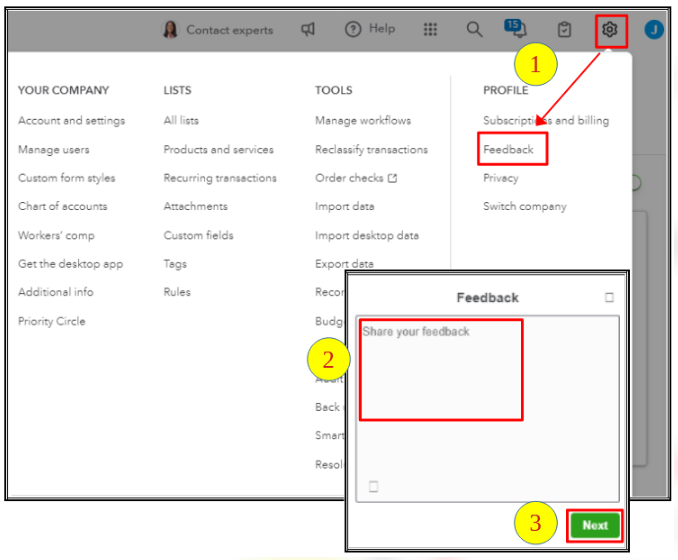
 

  1. Go to the Gear icon and select Feedback.
  2. Enter your comments or product suggestions.
  3. Tap Next to submit.


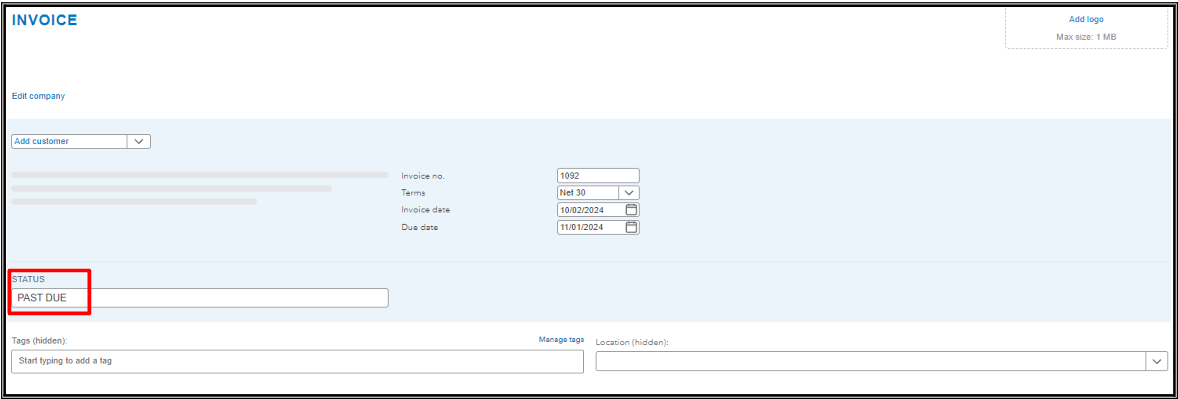
As a workaround, you can create a custom field on your invoices to manually indicate they are past due.
 

Additionally, you can refer to this article about personalizing your sales forms: Customize invoices, estimates, and sales receipts in QuickBooks Online.


Let us know if you have other concerns with customizing your invoices. We're here to help you in any way we can.

1 reply

JanbonNQuickBooks TeamAnswer
QuickBooks Team
October 2, 2024

Let's submit this request to our engineering team, @Fab234.


Currently, adding a past-due stamp on your invoice is not available in QuickBooks Online (QBO). That said, I recommend sending feedback directly to our product engineers so they can consider adding this functionality for future updates.


To send your request:


  1. Go to the Gear icon and select Feedback.
  2. Enter your comments or product suggestions.
  3. Tap Next to submit.


As a workaround, you can create a custom field on your invoices to manually indicate they are past due.


Additionally, you can refer to this article about personalizing your sales forms: Customize invoices, estimates, and sales receipts in QuickBooks Online.


Let us know if you have other concerns with customizing your invoices. We're here to help you in any way we can.

Fab234Author
October 3, 2024

Hi, thank you so much for letting me know. I will let send thar feedback.


thank you, Marlene
