Hi there, Elliot.
I appreciate your efforts in following the suggested steps. To proceed further, you may need to double-check your bank rules if there is a rule that automatically categorizes your transactions as Shareholder Distributions.
Here's how:
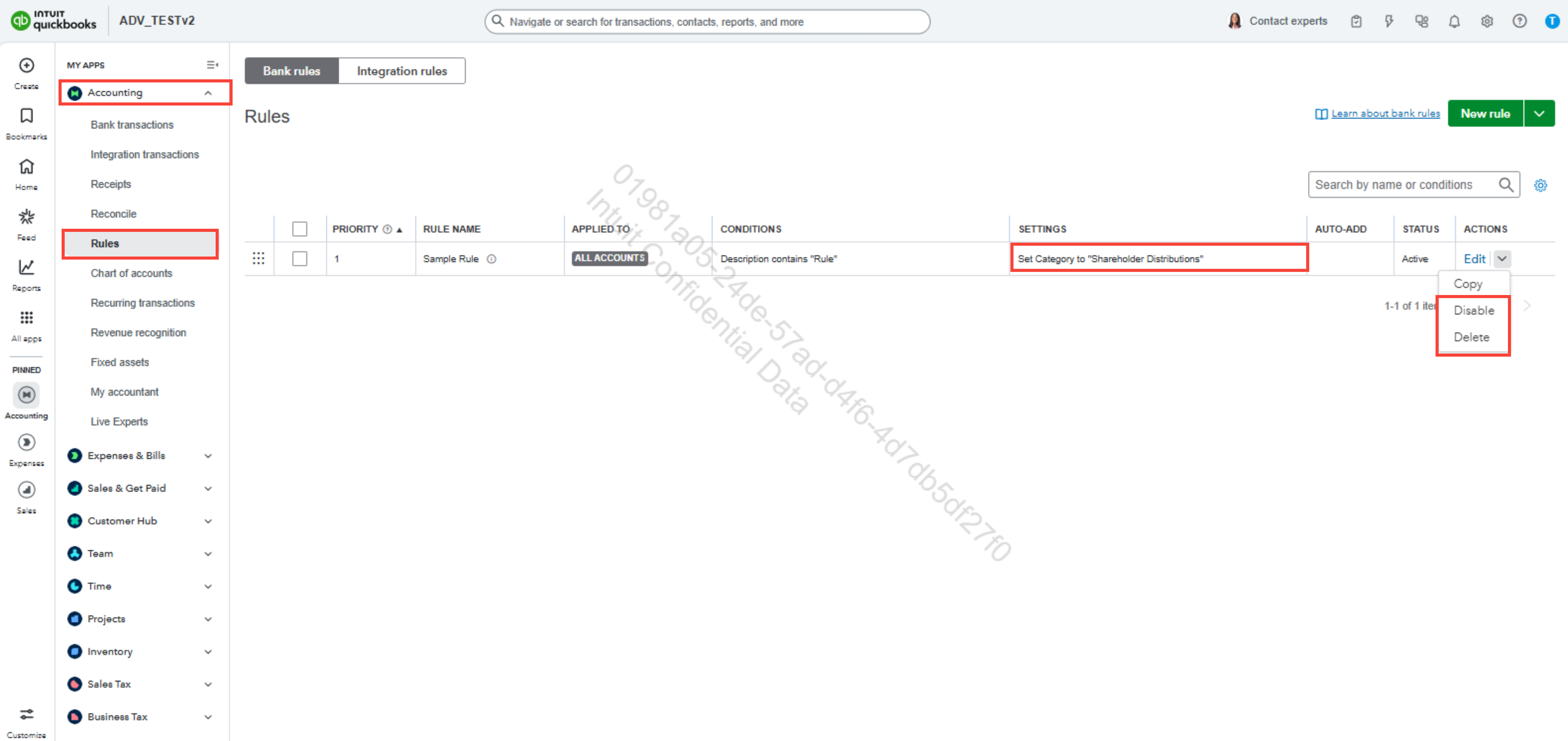
- Go to the Accounting tab.
- Select Rules.
- Locate the bank rule that categorizes the transactions as Shareholder Distributions.
- Click the dropdown to Disable or Delete the rule.
If the issue persists, we recommend contacting our QuickBooks Online (QBO) live support team. Our specialists are equipped to investigate this matter thoroughly and help guide you to a resolution.
Here are the steps to reach our support team:
- Go to the (?) Help icon in the top-right corner.
- Click Search and enter a keyword related to your concern.
- Select Contact Us.
- Provide a brief description of your concern, then click Continue.
You can check our support hours to see when assistance is available and ensure you receive help promptly.
Feel free to add a reply if you have further questions about QBO.
