
Get 50% OFF QuickBooks for 3 months*

Buy now
Switch to QuickBooks and 70% off for 3 Months
June 22, 2025
Question

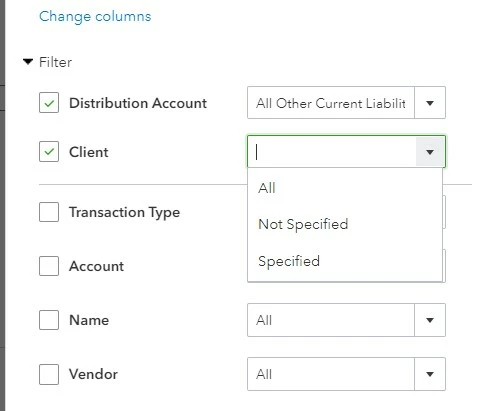
Trouble searching for client in a custom report

  • June 22, 2025
  • 1 reply
  • 7 views

Trouble searching for client in a custom report.

This is happening in QBO online in Chrome and while using the QBO desktop app. 

Anyone else having this same issue ?


1 reply

EduardA
QuickBooks Team
June 22, 2025

There are no widespread issues reported regarding the ability to search for a client in a custom report, @DeviyaC.


I recommend performing some basic browser troubleshooting, as the issue you're experiencing can be caused by excessive stored data in your browser's cache. This can slow down your browser's performance and lead to data loading issues in QuickBooks.


Now, let's clear your browser's cache to remove the excessive stored data. The following links below will guide you through the troubleshooting steps for your specific browser:


If the issue persists even after doing the troubleshooting steps for your specific browser, I recommend contacting our Live Support team so they can have this issue checked with their tools. Here's how to reach them:


  1. Go to the Help icon, then select the Search tab.
  2. Enter 'Support' in the search box.
  3. Click Contact Us.
  4. Choose either Chat or Callback options. Optionally, you can schedule an appointment.


Remember to check the availability hours of our support team to ensure a successful connection.


Also, you might find this article helpful for scheduling and emailing your memorized reports in QuickBooks: Set schedule and email information for a memorized report in QuickBooks Online.


Please feel free to reach out if you need further assistance with your custom reports in QuickBooks.
