
Get 50% OFF QuickBooks for 3 months*

Buy now
Switch to QuickBooks and 70% off for 3 Months
September 3, 2025
Solved

Inflexible transaction type value

  • September 3, 2025
  • 1 reply
  • 4 views

Hi everyone,

I'm really struggling to make QuickBooks work without linking a bank account. I can manually add transactions just fine, but I can't see any way of changing the transaction type from 'Cash on hand'. This isn't a problem for now, since I can just submit the correct info in my tax return, but I'm concerned that it will cause problems for Making Tax Digital in the future. Does anyone know whether this is an issue, or whether the transaction type is just an internal value that doesn't appear on generated reports, etc.?

Best answer by AdonL

Thanks for reaching out to us, @Samuel B . Using QuickBooks Online (QBO) without linking a bank account can be tricky, but it's definitely doable. I'm here to help you navigate this and ensure you're prepared for Making Tax Digital.


If I may ask first, when you manually add transactions but don't see a way of changing the transaction type from Cash on hand, are you in the process of importing bank transactions and have selected a new account for the bank file you want to upload?


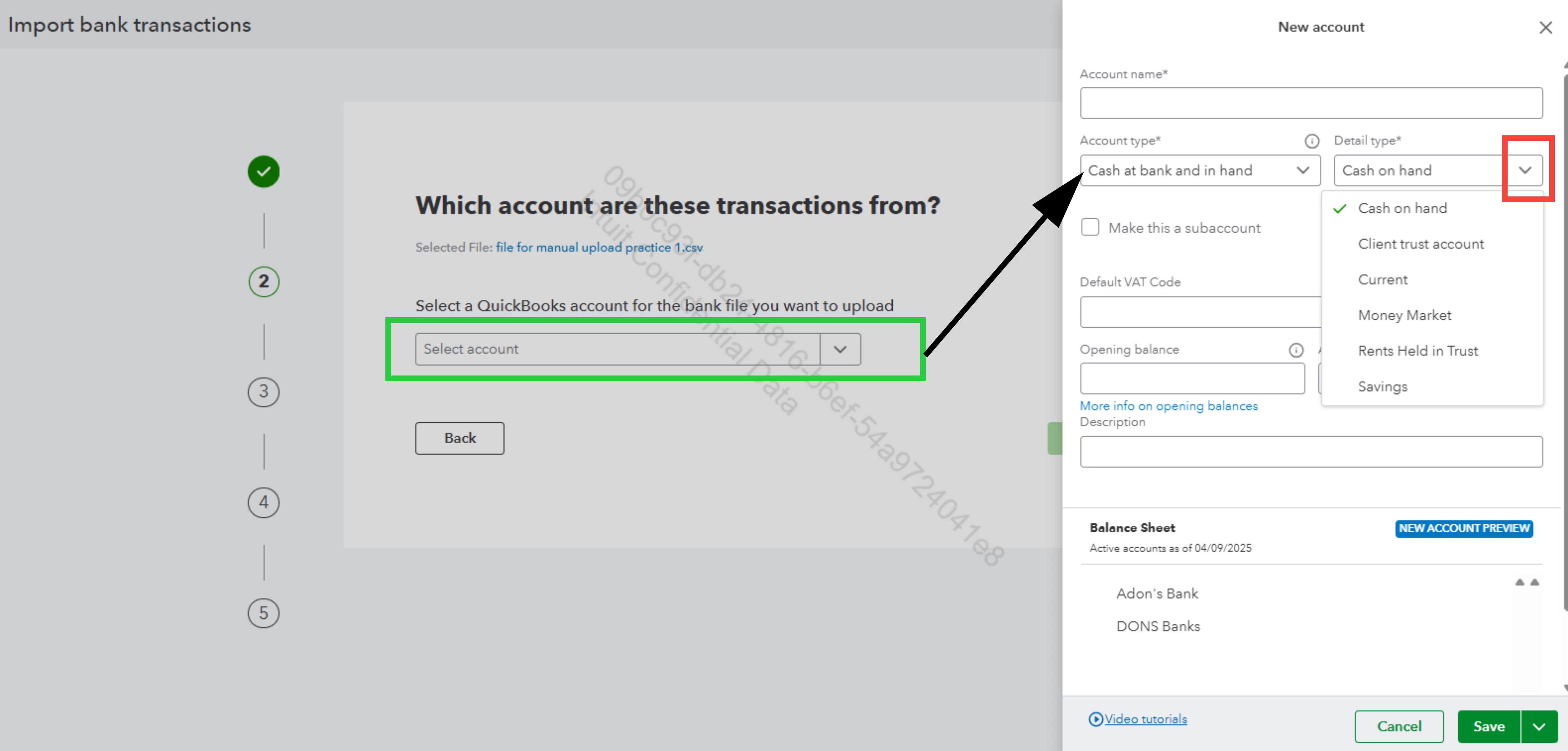
If so, it's noteworthy that when selecting/creating a new bank account (Cash at hand and in bank) when importing bank data, the program defaults to Cash on hand as the account detail type. However, you can easily change this by clicking the dropdown arrow next and selecting a more appropriate option.


Refer to this screenshot for visual reference:   
 

If you're referring to something else, please provide more details about where exactly you're seeing this transaction type. This information will help me provide a targeted solution.


Regarding Making Tax Digital (MTD), the transaction type is generally used for categorization within QuickBooks and doesn't affect the financial data reported for tax purposes. Yet, using the correct transaction types can make your bookkeeping more accurate and easier to manage.


To help you gain more about MTD and how it relates to QuickBooks, check out this article that you might find useful: Making Tax Digital in QuickBooks.


I hope this information helps clarify the situation with transaction types and eases your concerns about Making Tax Digital. If you're still facing challenges, don't hesitate to reach out again. I'll ensure you can use QBO effectively, regardless of how you choose to manage your accounts.

1 reply

AdonLQuickBooks TeamAnswer
QuickBooks Team
September 3, 2025

Thanks for reaching out to us, @Samuel B . Using QuickBooks Online (QBO) without linking a bank account can be tricky, but it's definitely doable. I'm here to help you navigate this and ensure you're prepared for Making Tax Digital.


If I may ask first, when you manually add transactions but don't see a way of changing the transaction type from Cash on hand, are you in the process of importing bank transactions and have selected a new account for the bank file you want to upload?


If so, it's noteworthy that when selecting/creating a new bank account (Cash at hand and in bank) when importing bank data, the program defaults to Cash on hand as the account detail type. However, you can easily change this by clicking the dropdown arrow next and selecting a more appropriate option.


Refer to this screenshot for visual reference:   


If you're referring to something else, please provide more details about where exactly you're seeing this transaction type. This information will help me provide a targeted solution.


Regarding Making Tax Digital (MTD), the transaction type is generally used for categorization within QuickBooks and doesn't affect the financial data reported for tax purposes. Yet, using the correct transaction types can make your bookkeeping more accurate and easier to manage.


To help you gain more about MTD and how it relates to QuickBooks, check out this article that you might find useful: Making Tax Digital in QuickBooks.


I hope this information helps clarify the situation with transaction types and eases your concerns about Making Tax Digital. If you're still facing challenges, don't hesitate to reach out again. I'll ensure you can use QBO effectively, regardless of how you choose to manage your accounts.

Samuel BAuthor
September 6, 2025

Thank you for the quick and helpful reply. That makes me feel better about MTD. Previously I had just been using the 'Add Transaction' button to add each transaction one by one, and I couldn't find an option there to change the transaction type. From your reply I realized that there are more options available when uploading a bank statement as a .csv file, and I managed to successfully make that work.

QuickBooks Team
September 6, 2025

You're more than welcome, Samuel.

We're pleased to hear that the guidance from my colleague @AdonL helped address your concerns. 

Don't hesitate to always ask for help if you need anything else.