
Get 50% OFF QuickBooks for 3 months*

Buy now
Switch to QuickBooks and 70% off for 3 Months
December 15, 2020
Question

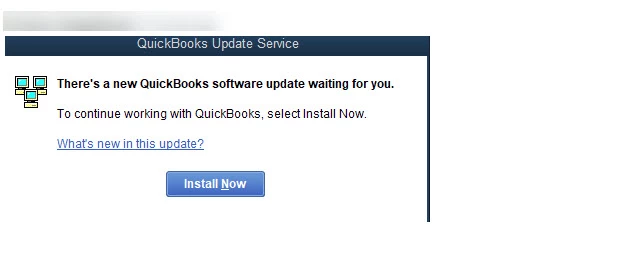
There's a new Quickbooks software update waiting for you

  • December 15, 2020
  • 19 replies
  • 86 views

Up until today, users were able to bypass QuickBooks update prompts but I’ve had two users this morning that have the error below and can’t get past it. I’ve tried a repair install but that didn’t work. I had to do a complete removal and reinstall of QuickBooks Enterprise 20 (R6) and then they can get into the file again


Why all of a sudden can two users not open QB without updating? The rest of the users on QB Ent 20 R6 are in the file working.
 

19 replies

MariaSoledadG
QuickBooks Team
December 15, 2020

Let me provide you information on why you'll need to update QuickBooks Desktop to the latest release, paul83.


Intuit regularly launches new updates and releases to improve program functionality. These updates are maintenance or patch product releases that improve functionality and resolve several problems. It's highly recommended that users have to update so they can open QuickBooks and prevent issues along the way.


Aside from that, make sure that users are using the minimum system requirements to ensure compatibility, thus making QuickBooks works without issues.


For more information and reference, you can browse these help articles in QuickBooks. 


Reach out to us if you have any concerns about updating. As always, we're always right here to help you if you have are experiencing issues.

paul83Author
December 15, 2020

@MariaSoledadG wrote:

Let me provide you information on why you'll need to update QuickBooks Desktop to the latest release, paul83.


Intuit regularly launches new updates and releases to improve program functionality. These updates are maintenance or patch product releases that improve functionality and resolve several problems. It's highly recommended that users have to update so they can open QuickBooks and prevent issues along the way.


Aside from that, make sure that users are using the minimum system requirements to ensure compatibility, thus making QuickBooks works without issues.


For more information and reference, you can browse these help articles in QuickBooks. 


Reach out to us if you have any concerns about updating. As always, we're always right here to help you if you have are experiencing issues.


I'm aware that Quickbooks releases updates often as I manually patch workstations at scheduled intervals but the user typically has an option to "install later" so they can bypass that screen and continue to work. This morning those two users did not have that option. 

Angelyn_T
Moderator
December 15, 2020

Thank you for following up with us, @paul83.


Yes, there is an Install Later option under the QuickBooks Update Service window when trying to open QuickBooks. But the tab is not available when a force QuickBooks update is needed. Thus, these two users need to click on the Install Now button to establish an update and open QuickBooks.


Once these users close and reopen QuickBooks, they'll now have the choice to select the Install Later.


To learn more about QuickBooks updates, you can check out this link: Update QuickBooks Desktop to the latest release.


Just in case you need additional resources while working with QuickBooks Desktop, you can as well open the topics from our help articles.


If you have other questions, please feel free to click the Reply button and add a comment below. I'll be right here to provide additional assistance. Wishing you and your business all the best!

December 16, 2020

I am having the same issue.

MaryLurleenM
Level 6
December 16, 2020

Did the issue persist even after installing the latest QuickBooks update, creditcard?


The update happens regularly to make sure your company file will work efficiently. It's to avoid encountering errors while using the program.


If you're still prompted to install even after doing so, I suggest contacting ur QuickBooks Desktop support so they can check further.

  1. Click Help at the top menu and select QuickBooks Desktop Help.
  2. In the Have a Question? window, enter a topic.
  3. Click Contact us.
  4. Hit the Start Messaging button.

I'll be right here if you have other concerns.

paul83Author
December 16, 2020

Last night we updated each machine one by one to R10 so everything is fine now but I was just curious why we had to do this out of the blue. Typically users can just say "install later" to bypass the update.


December 22, 2020

QuickBooks:

The question people are asking and what we want answered is why is this update not allowing us to install later? I have only seen this on critical / security updates but on this one I looked at the release and do not see anything critical listed. 

We also have clients that are calling us because Quickbooks is forcing the update and they cannot login without running it. We are also having to drop everything to run these updates so clients can continue to work. 

This has happened on QuickBooks Desktop versions 20 Enterprise and 19 Premier. The update later option is not available. 

None of these files have been updated by the admin or anyone else (users do not have admin rights to run the update)  so it's not due to someone running the update already and forcing the other users to update.  

What exactly is in the newest update that is causing it to be forced?  

I have worked in QuickBooks for 15 years so I'm very familiar with the update process and do not need explanation on that. Just would like to know what is so important about this update that it is being forced, and why is there no information published about it except this post contributed by paul83? 

All of our clients are very frustrated about it. 


December 22, 2020

Yes please respond as to what are the critical updates needed right at what is the EOY for most businesses.

We are an IT company that have numerous customers calling us needing assistance.  We had no notice of this so now we are left to scramble for them on qb behalf.  It's the end of the year and right now I need a work around to avoid updating.  We have a strict policy to never click an update, the last time a user clicked it we were down for days fixing a mess it created.

December 29, 2020

after the message of update waiting to be installed.  in addition it says DON'T HAVE REQUIRED PERMISSION.  CONTACT ADMINISTRATER.     CLOSE QUICKBOOKS

I open under run as administrator  but get same message.    my IT people are trying to see what the problem might be.  Can you help??????????????

QuickBooks Team
December 29, 2020

Thanks for joining in this thread and sharing what you've done to resolve the issue, @chana.


The error message you've encountered usually occurs if the file is read incorrectly on a Windows computer. To resolve this, follow the below steps:

  1. Close all the programs.
  2. Restart your computer.
  3. Right-click QuickBooks Desktop icon.
  4. Tap Run as the Administrator.

You can also check if you've successfully login as administrator. Here's how:

  1. Go to the Company menu at the top.
  2. Click the Users tab.
  3. Choose View Users.

Once verified, update your QuickBooks Desktop account again. See this article for guidance: Update QuickBooks Desktop to the latest release.


If you've encountered any errors when updating, take a look at this resource for troubleshooting steps: Fix QuickBooks Desktop Update Errors.


Keep me posted how things goes on your end. I want to ensure this gets resolved for you. Take care and have a great day.

December 29, 2020

We also have this issue with QB 20 R6 forcing an upgrade on several users. If I proceed with this upgrade will I have to upgrade all the company files? I usually don't have to upgrade Company files until a major upgrade like QB 18 to QB 20. 

January 11, 2021

I need help with quickbooks TODAY, and can NOT talk to anyone and your articles from  a month ago are NOT helpful.  Super frustrated and this customer service is TERRIBLE!

I can not update my Quickbooks and it will not let me by pass by clicking "install later"..


January 11, 2021

This is me and there is NO help anywhere on what to do about this.!  TERRIBLE CUSTOMER SERVICE!!!!!

MichelleBh
Level 8
June 18, 2021

I've got just the steps you need to resolve your QuickBooks problem, @Mrb53.


I appreciate all the actions you've done in resolving your QuickBooks Desktop (QBDT) that closes immediately. I've got another troubleshooting step that will help resolve your account.


Have you tried the workarounds steps provided by my colleagues above? Thus, you can open your account seamlessly and get back where you left off. Here are the lists of the workarounds outlined in this thread if you didn't try them yet.


  1. Ensure that your computer meets the system requirements. So, QuickBooks works without issues. 
  2. Avoid clicking the QBDT icon multiple times, sometimes, it won't open. Thus, please allow QuickBooks enough time to load before you continue.
  3. Run as administrator or end the Task Manager
  4. Download QBDT directly to our website. The steps and screenshots outline by peer Tori_B in this conversation. 
  5. Delete pending patches and disable QuickBook's ability to update itself. You can follow the article provided by BigRedConsulting


If the same thing happens, you can proceed to solutions 2 to 5 outlined in this article: Fix QuickBooks Desktop won't open.


I know you've already called in. However, if the issue keeps going, I'd suggest getting in touch with our technical support again. They have available tools to check your account and can send a ticket to our engineers for further investigation. Ensure to call them within our support hours to guarantee we address your concern. If you have the case ID handy, please provide that to our agents. This way, they can help and look for the details of your issue quickly.


Additionally, here’s what’s included in the QBDT 2021 release and how you can use them to benefit your business: What’s new in QuickBooks Desktop 2021.


Lastly, If you've encountered any errors when updating, take a look at this resource for troubleshooting steps: Fix QuickBooks Desktop Update Errors.


You can drop a comment below if you need further assistance or help with your QuickBooks. Take care. 

October 24, 2021

I can no longer access my client's QB file because I disregarded the notice saying "you must log in as system administrator", since my client has no idea how to do that or what the system administrator password is.  I access their file remotely, as they are in Portland and I am in Los Angeles.  What are steps to reopen the file, as we are now effectively out of business.  I tried calling support, was told the office is closed.

Moderator
October 24, 2021

Thanks for joining the thread, ml1237.


I'm here to help you with opening the company file for your client.


There are times when the company file won't open and no error message or warning. If you want to access QuickBooks files on a host or server computer, windows may prompt you to enter a network password. If this happens, you can either log in using the network password or turn off the feature. Do this on the server or host computer. I'll show you how.


  1. Open Control Panel.
  2. Choose Network and Sharing Center, then Change advanced sharing settings.
  3. Expand the Profile type that you are using.
  4. Under Network Discovery, select Turn on network discovery.
  5. Under Password protected sharing, select Turn off password protected sharing.
  6. Click Save changes.


Then, you can locate and open the company file:


  1. Go to the File menu, click Open or Restore Company.
  2. Select Open a company file, then Next.
  3. Browse and locate the company file with file extension .qbw.
  4. Choose Open.
  5. If prompted, enter your user name and password.


You can review this article for more detailed information: Open a company file located on a remote computer.


If the issue persists, you can follow the extra troubleshooting procedures outlined in this resource: What to do if you can't open your company file in QuickBooks Desktop.


In addition, I've added this material if you need to add, edit, or remove user's access in QuickBooks Desktop: QuickBooks Desktop Users and Restrictions.


You can count on me if you need further assistance opening the company file. Just leave a comment below, and I'll get back with more details.

October 28, 2021

Make THAT "3" of us...only I have Premier 19!!!!!

Tori B
QuickBooks Team
October 28, 2021

Hey there, @robertheit


Thanks for following the thread and letting us know that you're also having trouble opening the company file. 


I wanted to ask if you have tried the steps provided by my colleague Giovann listed above? If not, I encourage you to give them a try. Those are typically the best steps to take when having issues getting into the company file remotely. Ensuring the networking and file sharing is set up properly is key to opening the company file from different computers/users. 


However, if you have gave those steps a shot, are you getting an specific error message? If so, could you share a screenshot? 


I want to make sure we get you back on track to get you back to business.  Please provide any additional details that you can. This way, I can know what route to take based on what you've tried and haven't. 


I'll be sure to keep an eye out for your reply and look forward to chatting with you soon. Take care! 

chewy-chewbacca
November 3, 2021

If you are dealing with a forced QB patch/update, the kind of update with a countdown, where you have no more attempts to install, and only a "Close Quickbooks" button, here's how you can work around it below. This can buy you some time to upgrade the site and possibly disable auto updates moving forward.


CTRL-ALT-DEL

Task Manager

Find the Quickbooks process, expand the child process and terminate "Quickbooks Update Service" by ending task. 


November 3, 2021

thank you, the issue has been resolved.

November 4, 2021

I have multiple users complaining they can't log in or do anything because they don't have the required permissions to install an update. They just get a prompt that says "Close Quickbooks." They're running the same version as the server, and other users on that same version can log in. If I log in as a system administrator and try to launch Quickbooks, it just says to reboot the computer no matter how many times I do that. I am not taking my entire site down in the middle of the day to download and install updates because of some feature you're trying to push that we're obviously not using because we haven't had it until now. The second we find something better we are dropping QB and not looking back because the constant interruptions and intrusions are intolerable.