
Get 50% OFF QuickBooks for 3 months*

Buy now
Switch to QuickBooks and 70% off for 3 Months
October 12, 2024
Question

V 34.0 Desktop Upgrade Freezes on "Writing system registry values" Pop-Up (Solution)

  • October 12, 2024
  • 13 replies
  • 69 views

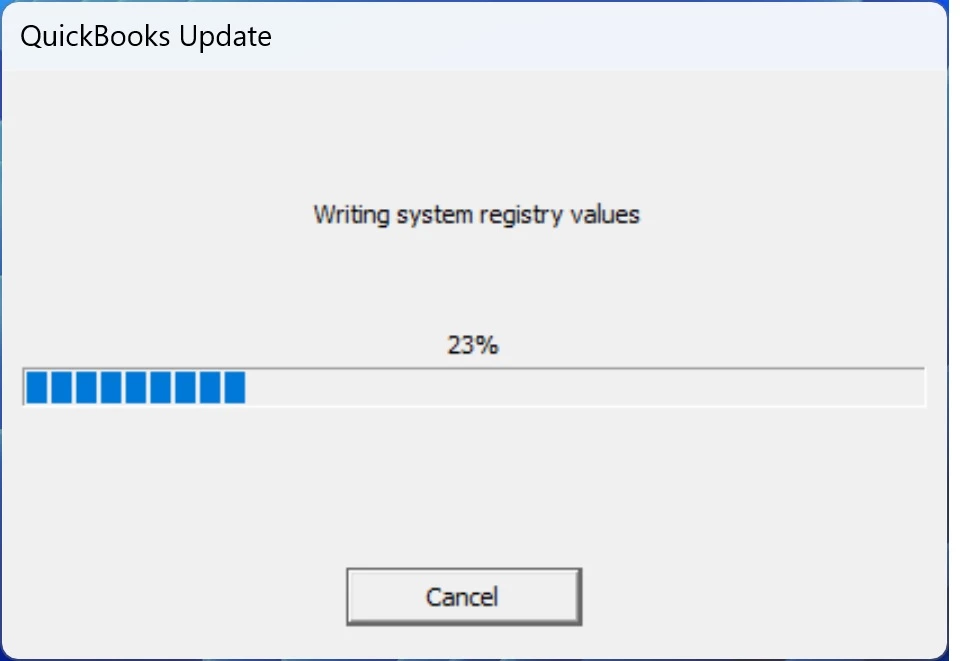
Our QuickBooks Desktop v34.0 update repeatedly failed to install on Windows 11, freezing on a "Writing system registry values" pop-up shown below.


After cancelling several update attempts to unfreeze that pop-up, we eventually found that the solution was to temporarily disable Windows Defender.


13 replies

JaeAnnC
Level 6
October 12, 2024

We acknowledge your contribution to the QuickBooks Community, @Paul-TX.


We appreciate the solution you provided to resolve the pop-up freeze when updating your QuickBooks Desktop (QBDT). Your insights will surely provide valuable guidance for other users who may encounter similar issues in the future.


In addition, you'll want to create a backup of your company file to save all the data currently in your account. Doing so helps you restore it whenever you encounter problems.


We'll be happy to see you back in this forum if you have additional insights to share or need further guidance in updating your QBDT company. We're always here to assist. Stay safe, and have a great rest of the day.

October 12, 2024

We just downloaded the latest upgrade this morning, tried to apply it and are now receiving the same error as you --> Freezes at Writing system registry values.


Disabled Windows Defender on both private and public network.  Attempted upgrade again --> still freezes.


Please help

QuickBooks Team
October 12, 2024

I appreciate you sharing the steps you've taken to resolve the issue, @scout94. I'll provide clarification and additional support to help you continue updating your QuickBooks Desktop (QBDT) seamlessly.

To enable installation, you'll need to add QBDT to your Bitdefender exclusion list. Disabling it won't fix the error.

If the issue persists, please contact our Customer Care Support team for further assistance. They have the right tools to access your account and investigate the matter in detail.

Here's how to reach them:


  1. Open your QuickBooks company.
  2. Select the Help (?) icon.
  3. Type your concern in the search field.
  4. Click on Contact Us.
  5. Choose a way to connect with an expert:


  • Chat with an expert
  • Get a Callback


Additionally, you'll want to save a copy of your financial data to safeguard it against potential technical issues or corruption. 

If you have any further questions about the installation process or the next steps to take, please don't hesitate to ask. It's always our pleasure to help.

December 2, 2024

V 34.0 Desktop upgrade will not install, freezes even when temporarily shutting down Defender.


You have a problem.

October 14, 2024

Same issue on Windows Server 2022 RDS.

October 16, 2024

Hi Everyone. I downloaded the R9 from the Downloads & Updates page, and it took about 75 minutes to apply. It did eventually process successfully.

October 15, 2024

It's still stinking stuck

October 15, 2024

So I also had to do these things to the ridiculous Windows 11 platform: In the windows security settings, I had to:


https://www.falconitservices.com/quickbooks-update-stuck-or-slow-during-writing-system-registry-values/


And thin it worked. This is why for everything else in my digital life, which I am slowing extricating myself from, I use a MAC. and am a total social medial luddite.

counting    d o w n the d a y s to r e t I r e m e n t


And good riddance to Intuit when I do!!!!!! 

October 18, 2024

Hello!  I’m suffering from the same issue while trying to update to version 33.0

QuickBooks Team
October 18, 2024

Let's perform a manual update to get the latest product enhancements and apply critical fixes for your QuickBooks, GingerM3. I'll show you the steps to carry out this task.


The Writing system registry values issue in QuickBooks Desktop (QBDT) often occurs during updates and can be caused by antivirus or security software interfering with the installation process. 


In addition to the solutions shared by our customers on this thread, let's install the update directly from the Downloads and Updates site. Here's how: 


  1. Click on this link: Downloads & Updates.
  2. On the Standard setup screen, choose your region (United States (US) from the Select Country drop-down.
  3. Pick your desktop product from the Select Product drop-down and the specific year for the version.
  4. Click the Search button.
  5. On the Here's your product screen, click the Get the latest updates link to install the update.


I've added some resources that provide direction on how to tackle installation issues or errors:


Browse through this guide to find out about the recent fixes and enhancements introduced in the latest update: Release notes for QuickBooks Desktop 2023.


Don't hesitate to leave a comment below if you have other product-related concerns or need further guidance navigating QBDT. The Community is available 24/7 to provide the help you need. 

October 18, 2024

How do I resolve this issue with Server 2016?

October 19, 2024

Hello, @WCG7551.


There's a good chance that antivirus or security software interference is causing the error in writing registry values on your system. Let's fix this by performing the solutions I'll share below.


If you haven't already, please follow the steps shared by my colleague Rasa-LilaM and manually install updates from the Downloads and Updates website to ensure you have the latest critical fixes for your software.


If the issue persists, we can perform a clean install to reset all files and settings to their default state to improve QuickBooks performance. Here's how:


  1. Create a backup of your QBDT company file.
  2. Download the installer for your QuickBooks version and keep your license number handy.
  3. You follow the solutions outlined in this article to uninstall and reinstall QuickBooks Desktop: Reinstall QuickBooks Desktop.
  4. Restore your company file to return to one of the save points of your business.


Also, you can run reports to review your financial data and get a snapshot of your business's financial growth: Understand reports.


If you have any additional questions, don't hesitate to reach out to the Community. I'm always here to help you with your company file concerns. Stay safe!

October 21, 2024

I tried disabling Windows Defender but that did not help.  This is what helped and was suggested a few comments below, as well . . .  You must disable all of your Windows virus protections.  Go to  https://www.falconitservices.com/quickbooks-update-stuck-or-slow-during-writing-system-registry-values/

Also, a note to Intuit Quickbooks that this is very irresponsible of you not to be working with Windows before a new release!  It puts all of your clients in a vulnerable position.

November 19, 2024

I had to do the same, disabled all protections and then it worked.  

October 22, 2024

I disabled Windows Defender as suggested below and the upgrade occurred without a hitch!!!

Level 5
October 22, 2024

Hello VeniceBB,


Thank you for chiming in! I am so happy the suggestion mentioned worked for you! If you need anything else, the Community and I are here! Take care for now, 

November 7, 2024

I have the same lockup issue using Windows 10

JenoP
QuickBooks Team
November 7, 2024

Our research indicates that this is caused by Microsoft Windows Defender's real-time scanning, Aspen Ridge Condos. I’d like to share a quick solution to help you install the update.


Please know that QuickBooks updates require changes to the operating system registry, which Windows Defender closely monitors as part of its security protocols.


To address this, our engineers have developed a specialized tool that creates an exception in Windows Defender. This tells Windows to allow the necessary changes, allowing it to trust QuickBooks' modifications and ensuring smoother updates.


You can easily access and use this tool through the QuickBooks Tool Hub. Here's a step-by-step guide to help you:


  1. Click the Cancel to stop the update and close the software.
  2. Open the QuickBooks Tool Hub application.
  3. Choose Installation issues, then click Add Defender Exclusion.
  4. Make sure to restart your computer to apply the exemption
  5. Reopen the software and start the update.


For more details and additional troubleshooting steps, please refer to this article: QuickBooks Update slows at writing system registry values.


For future reference, you may want to consider bookmarking these articles in case you might need them:


Please don't hesitate to ask if anything else comes up or if you need additional help when using this tool as well as updating the software. Your success is our priority, and we’re here to make sure you can focus on what matters most, running your business.

November 7, 2024

After following these instructions, I still have the problem of the update stopping when writing to the registry?